sanity-plugin-structure-inbox
Turns the empty Structure pane into an inbox. Forgotten drafts, stalling releases and open tasks in one sorted list, each row actionable on the spot.
Install command
npm i sanity-plugin-structure-inboxsanity-plugin-structure-inbox




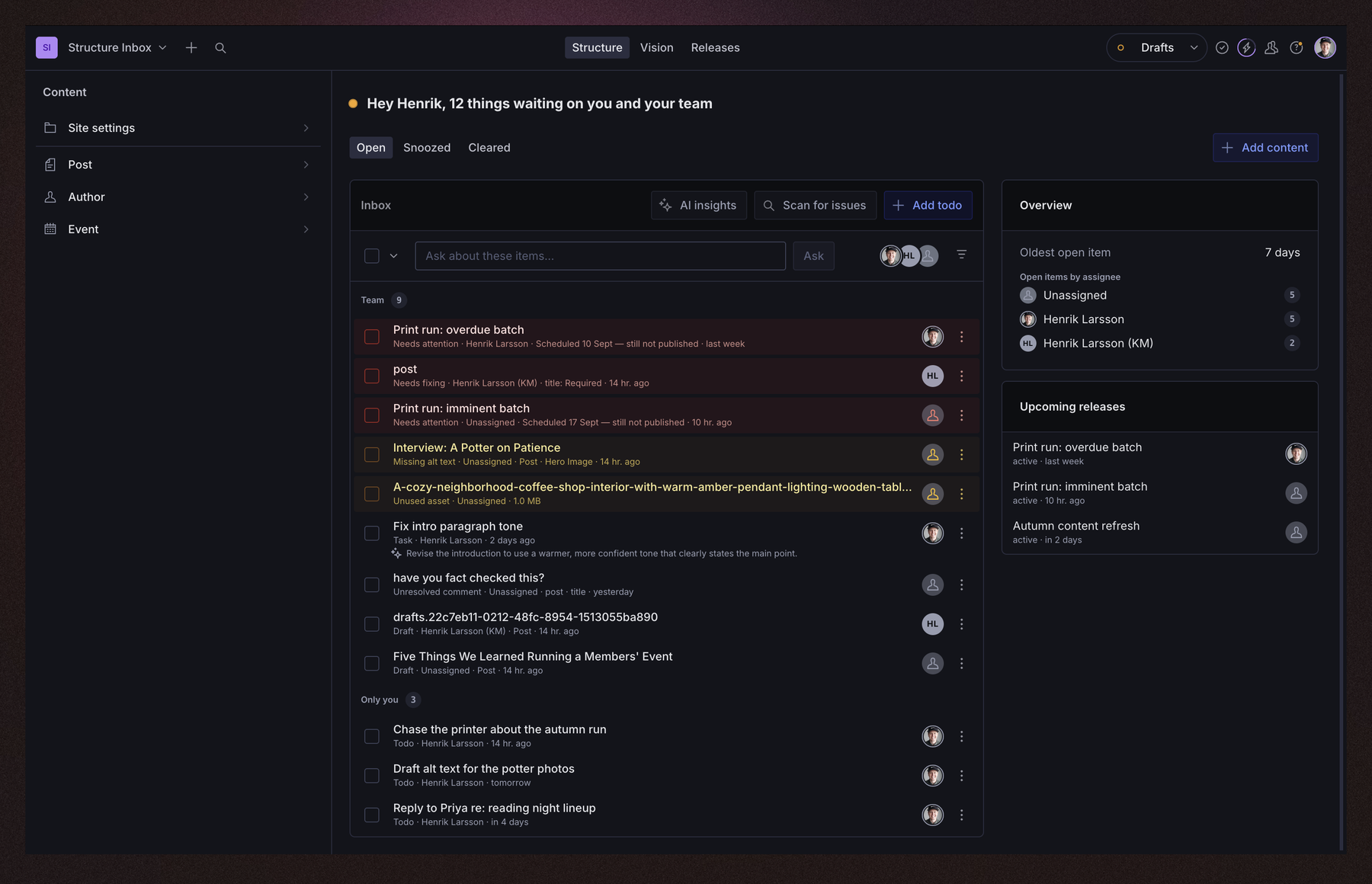
Turns the empty Structure canvas into an inbox. Drafts left unpublished, releases coming up, tasks assigned to you, and whatever else you feed it, merged into one list sorted by what needs attention first. It sits on the screen editors already land on, so nobody has to go looking for it, and every row can be opened, handed to a colleague, snoozed or ticked off without leaving the pane.
Requires Sanity Studio v6.
Contents
- Installation
- Usage
- Sources
- Selecting and acting
- Options
- AI features, and what they cost
- What leaves your dataset on an AI read
- Grounding AI reads in your project
- Alt text
- Optional: broken links via
sanity-plugin-link-checker - Optional: asking about all your items
- Optional: finding content gaps
- How it works
- Localized content
- Localization
- API reference
- Develop & test
- License
Installation
npm install sanity-plugin-structure-inboxUsage
Add it to plugins in sanity.config.ts, after structureTool() — order matters, since the
plugin extends the structure tool already in the array:
import {defineConfig} from 'sanity'
import {structureTool} from 'sanity/structure'
import {
  openTasks,
  structureInbox,
  unpublishedDrafts,
  upcomingReleases,
} from 'sanity-plugin-structure-inbox'

export default defineConfig({
  // ...
  plugins: [
    structureTool(),
    structureInbox({
      sources: [openTasks(), unpublishedDrafts({olderThanDays: 7}), upcomingReleases()],
    }),
  ],
})
Editors now land on the Inbox instead of a blank canvas. Nothing is added to your structure tree — the plugin teaches the root pane to resolve the Inbox id directly.
openTasksandupcomingReleasesabove only show real rows on a plan that actually has Tasks and Content Releases (see the plan requirements in the table below) — on a plan without them, that source just quietly renders nothing rather than an error.unpublishedDraftsworks on every plan, so it's a safer first source to reach for if you're not sure what your plan includes yet.
Sources
A source is a feed of inbox items. Eight ship with the plugin, plus one more (last row) via a separate, optional integration:
| Source | What it lists | Whose |
|---|---|---|
openTasks({limit, onlyMine, clearedWithinDays}) | Sanity Tasks assigned to you and still open (requires the Growth plan or above). | Yours |
unpublishedDrafts({olderThanDays, limit, types, onlyMine}) | Drafts that have sat untouched long enough to look forgotten. | Everyone's |
upcomingReleases({limit}) | Releases that are scheduled or still being filled (requires Content Releases, an Enterprise add-on). | Everyone's |
needsAttention({limit}) | Releases that are overdue, empty and imminent, or stalling (same Content Releases requirement as above). | Everyone's |
documentValidation({limit, types}) | Drafts currently failing their own schema's validation rules. | Everyone's |
| Oversized, unused, missing-alt-text, or poorly alt-texted image/file assets — and, where you say so, a one-click fix for the missing ones. | Everyone's |
unresolvedComments({limit, onlyMine}) | Unresolved comment threads (requires the Growth plan or above). | Yours |
todos({title, placement}) | A personal scratch list you type into, right in the pane. | Yours |
linkCheckerFindings() | Broken references and dead links — separate entry point, see below. | Everyone's |
Sources choose their column with placement: main (default) merges every main source's items
into one sorted list; aside gives a source its own small card in the narrow right column, for
context worth seeing but not acting on (upcomingReleases defaults here). The aside column
disappears entirely once every aside source is empty. Main-column rows sort by tone, then by
longest-waiting first.
A persistent Overview card (oldest open item, next snooze wake, overdue count, open items by assignee) appears in the aside column once the open list is long enough for a breakdown to say something the list itself can't — below ~12 open items it stays out of the way.
Most sources declare audience: openTasks/unresolvedComments default to onlyMine: true
(a task or a thread naturally belongs to someone); unpublishedDrafts defaults to
onlyMine:
falsetodos has no team-wide reading at all.A few operational notes worth knowing before you configure sources:
openTasks/unresolvedCommentsread from the Studio's addon dataset (the one Sanity Tasks and Comments already use) — a Studio that's never used either shows an empty section, not an error. Both rely on@beta/@internalSanity APIs, reached defensively so a removal shows an error card for that source instead of failing the whole Studio to boot.assetIssues's "unused" check is skipped (reports zero rows) once a project has more than 200 total assets, to avoid a slow query.assetIssuesreads your dataset's own assets (sanity.imageAsset/sanity.fileAsset). Assets held in Sanity's Media Library live in a separate resource, not as documents in your dataset, so this source reports nothing about them — an empty asset section on a Media Library Studio is that, not a failure. UseopenAssetto route asset rows into it yourself.assetIssues's alt-text checks cover top-level image fields only, in either convention: animagefield customized with analtsub-field, or a wrapper object (imageWithAlt) holding an image alongside analt. Images nested inside objects, arrays or Portable Text aren't walked.linkCheckerFindingsneedssanity-plugin-link-checkerinstalled and is imported from its own entry point — see Optional: broken links below.
Assigning an item to someone else
Most sources offer assign: select rows, pick a name from the Assign to… picker. This is
delegation, not ownership — a row doesn't need one natural owner to be worth assigning. Two
sources don't offer it: openTasks already has its own native (read-only, here) assignee field,
and todos has no shared document to label — it offers transfer ("Hand off to…") instead, for
handing your own todos to someone else before you leave a team.
With exactly one row selected, unpublishedDrafts and unresolvedComments also show a fact-based
suggestion above the picker (most recent editor, or the thread's own @mention) — never
pre-selected, always just one more click away from the picker itself.
Asking AI about an item
unpublishedDrafts offers assess: click Ask AI on a row for a one-line read via Sanity's
Agent Actions — "looks ready to publish", "still missing a hero image." Informational only; it
never writes to the document.
Writing your own
import {useMemo} from 'react'
import {useClient} from 'sanity'
import {type InboxSource} from 'sanity-plugin-structure-inbox'

export function needsReview(): InboxSource {
  return {
    name: 'needsReview',
    title: 'Waiting for review',
    placement: 'main',
    useItems() {
      const client = useClient({apiVersion: '2025-02-19'})
      // ...fetch into `rows`, then:
      const items = useMemo(
        () =>
          rows.map((row) => ({
            id: row._id,
            title: row.title,
            subtitle: 'Submitted for review',
            timestamp: row._updatedAt,
            intent: {type: 'edit', params: {id: row._id, type: row._type}},
          })),
        [rows],
      )

      return {items}
    },
  }
}
useItems is a plain React hook — reach for useClient, useCurrentUser, or any Studio hook you
need. Return resolve to make a tick complete the item for real (see below); return create to
offer an "Add" dialog; return remove for sources with no resolve that still need a way to clear
an item out for good.
If your query caps what it loads ([0...$limit]), also return overflow: how many more matched
than you returned. The list stays capped, but the headline and the nav badge count them, so fixing
one item takes one off the number instead of letting the next one slide silently into its place.
Leave it out if you filter after the fetch and can't count exactly.
Return loadMore(count) too and the list gets a "Show more" footer. The footer decides count (a
share of 50 rows per click, or everything left once it's 100 or fewer, with at most 200 rows in the
whole list), so add exactly that many, typically by keeping the limit in state and rebuilding the
query. The plugin keeps the rows already on screen while the next page loads.
Landing on the field, not just the document
An intent takes more than an id and a type. If your source knows which field
the row is about, pass a path and the Studio opens the document with that
field focused and the cursor already in it:
intent: {
  type: 'edit',
  params: {
    id: row._id,
    type: row._type,
    path: 'hero.alt', // or 'body[_key=="a1b2"].caption'
  },
}
Key array items by _key, not by index, wherever the path came from a scan or
a cached report — an index silently points at a different item once someone
reorders the array. A path that doesn't resolve focuses nothing, which reads as
a broken link, so send no path rather than a guess.
The built-in sources do this wherever they can: a broken link opens on the link, a missing alt text opens on the alt field, a validation failure opens on the first field that failed.
Every row with somewhere to go is a real link, so editors can cmd/ctrl-click or
middle-click it into a new tab and keep their place in the inbox. An intent
gets its URL from the router. A row that opens through openDetail instead can
set its own href. A new-tab click then calls openDetail(item, {newTab: true})
while the browser opens the URL, so run your side effects there, but don't
navigate.
Offering a fix
A source can also return proposeFix, which turns a row from a report into something an editor can
act on without leaving the pane. It only ever proposes: the returned apply is what writes, and
nothing calls it until the editor clicks Apply.
proposeFix: async (item, options) => {
  const fix = workOutTheFix(item)
  if (!fix) return null // nothing safe to suggest — the row just stays a link
  return {
    summary: `Set alt text to "${fix}"`,
    apply: async () => {
      await client.patch(item.documentId).set({'portrait.alt': fix}).commit()
    },
  }
}
Mark the item fixable: true so the row offers it at all, and quickFixable: true when the answer
costs nothing and needs no round trip. The difference is what makes bulk safe: the selection bar
only ever applies quick fixes, and it always passes {instantOnly: true}. A source that ignores
instantOnly turns one click on twenty selected rows into twenty billable calls, so honour it by
returning null rather than falling back to a paid path.
Rows advertising a free answer say "Quick fix" in their menu; the rest say "Fix with AI".
Memoize items, as above, or return it straight out of an observable. The plugin re-splits and
re-reports a source's items whenever that array changes, so building it fresh on every render means
reporting on every render. That is absorbed rather than trusted — the plugin compares the contents
before acting on a new array — but memoizing keeps the work off the render path to begin with.
A source can also offer useOpenCount(snoozes, now, dismissals), read by the exported
useInboxOpenCount() hook for a live count usable anywhere in the Studio (e.g. a navbar badge).
Count only what the pane would still show as open: skip cleared items, skip snoozed ones
(isSnoozed), and skip the ones this editor has already ticked off (isDismissed — both exported).
A count that ignores dismissals keeps reporting rows the pane has stopped showing, and the badge
is the number an editor sees all day:
import {useInboxOpenCount} from 'sanity-plugin-structure-inbox'

function MyBadge() {
  const count = useInboxOpenCount()
  return count ? <Badge>{count}</Badge> : null
}
Selecting and acting
Ticking a checkbox selects a row; the action bar then lets you choose what happens, spanning the whole merged list at once (mix a task and a draft in one selection).
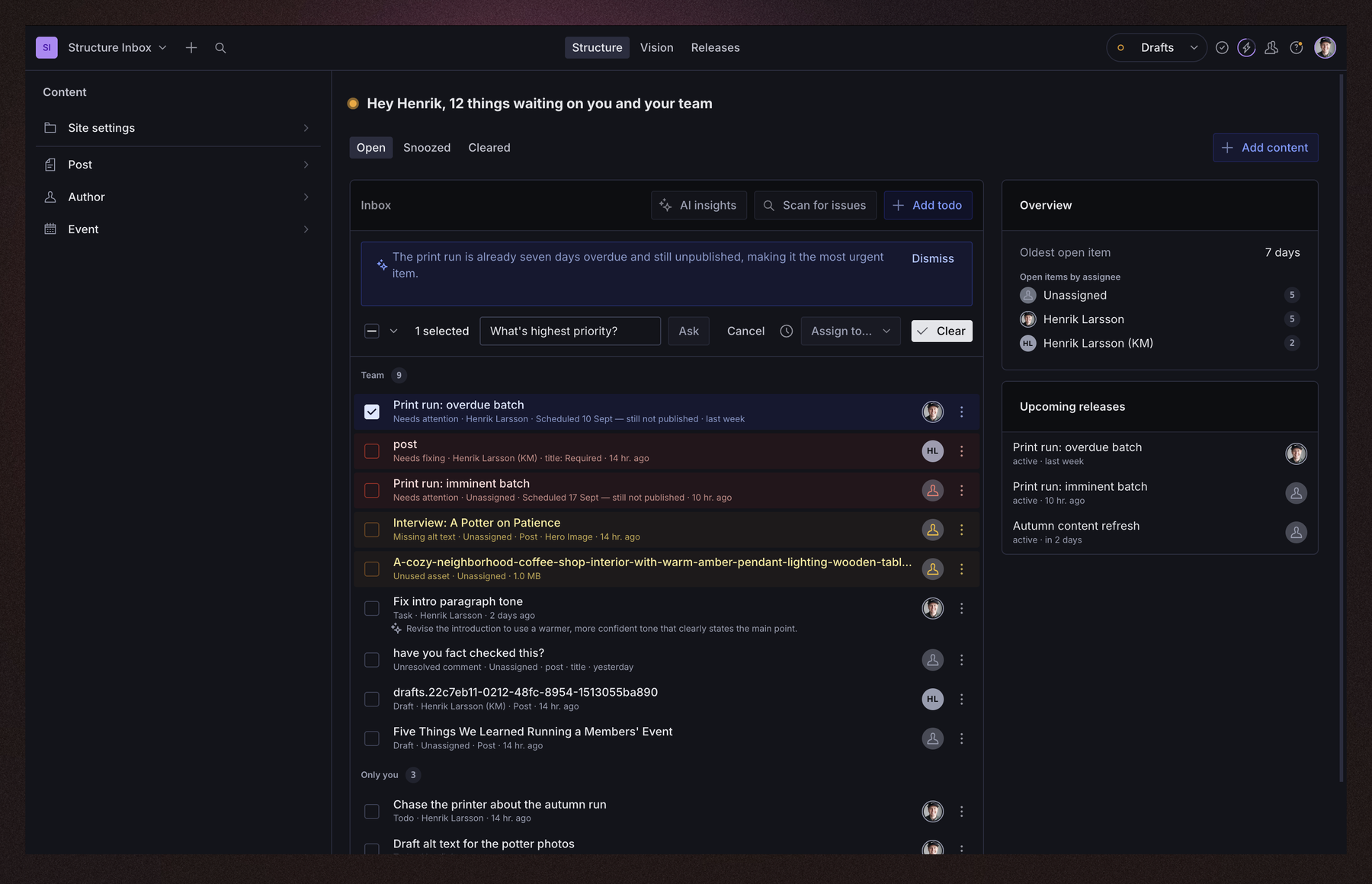
Open — everything not resolved and not snoozed.
Cleared — only items a source itself confirms are resolved with real evidence (today, only
openTasks). Never populated by an editor ticking something.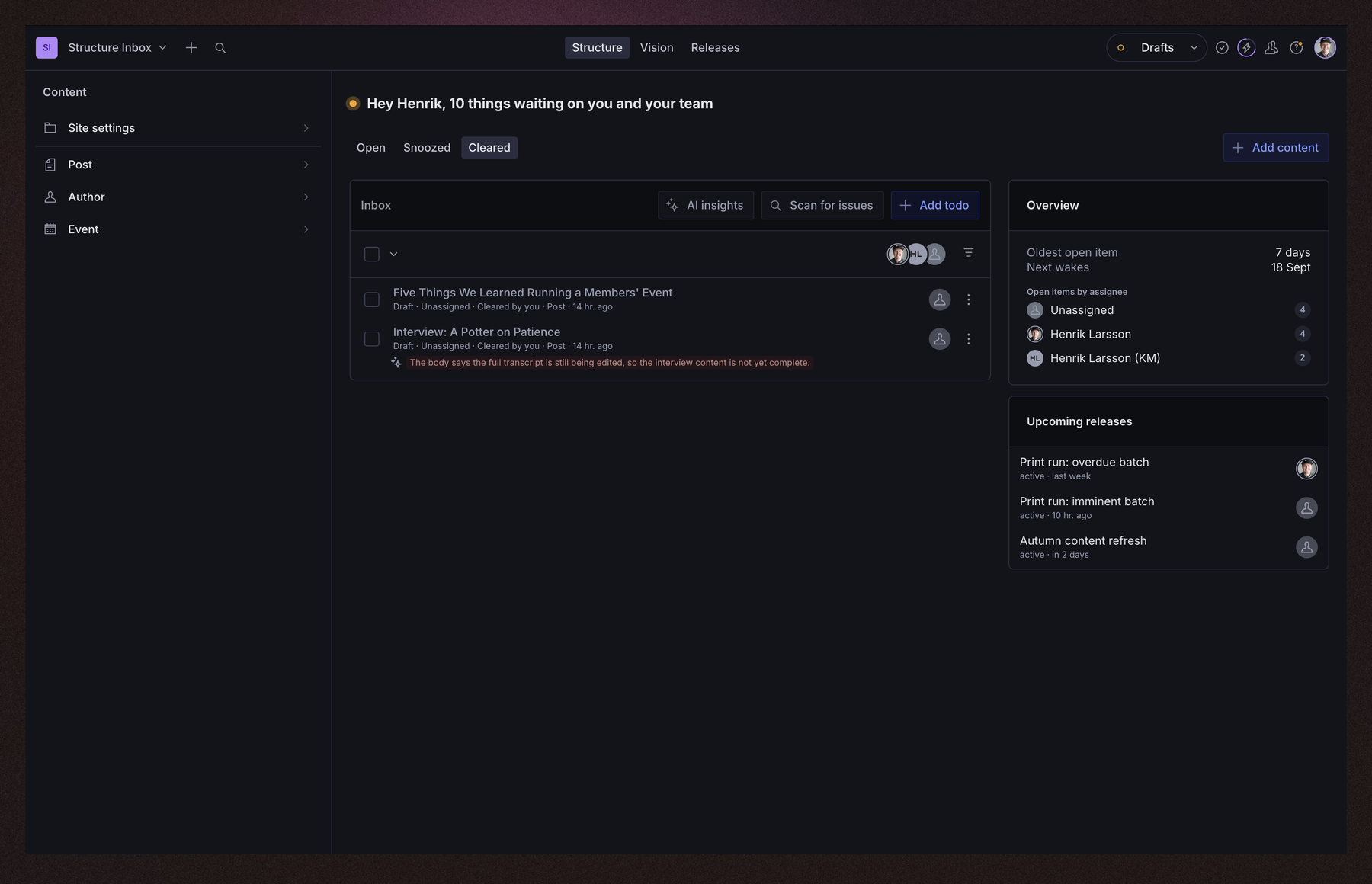
Snoozed — hidden until a chosen time, or until the item changes underneath the snooze, whichever comes first. Wake now brings one back early.
Acknowledge — a personal, non-binding "I've seen this" marker (a small checkmark), for sources with no
resolve. The item stays in Open regardless, and the mark expires if the item changes afterward.
The confirm button reads Mark as done for a source with resolve (completes the item where it
lives, e.g. closes the task), or Acknowledge for one without (a draft, a release, a todo) — a
mixed selection does both at once. unpublishedDrafts also offers Suggest a time next to
Snooze: an explicit click sends the document to Agent Actions for a date-aware suggestion, never
applied without a second click.
Filtering the list
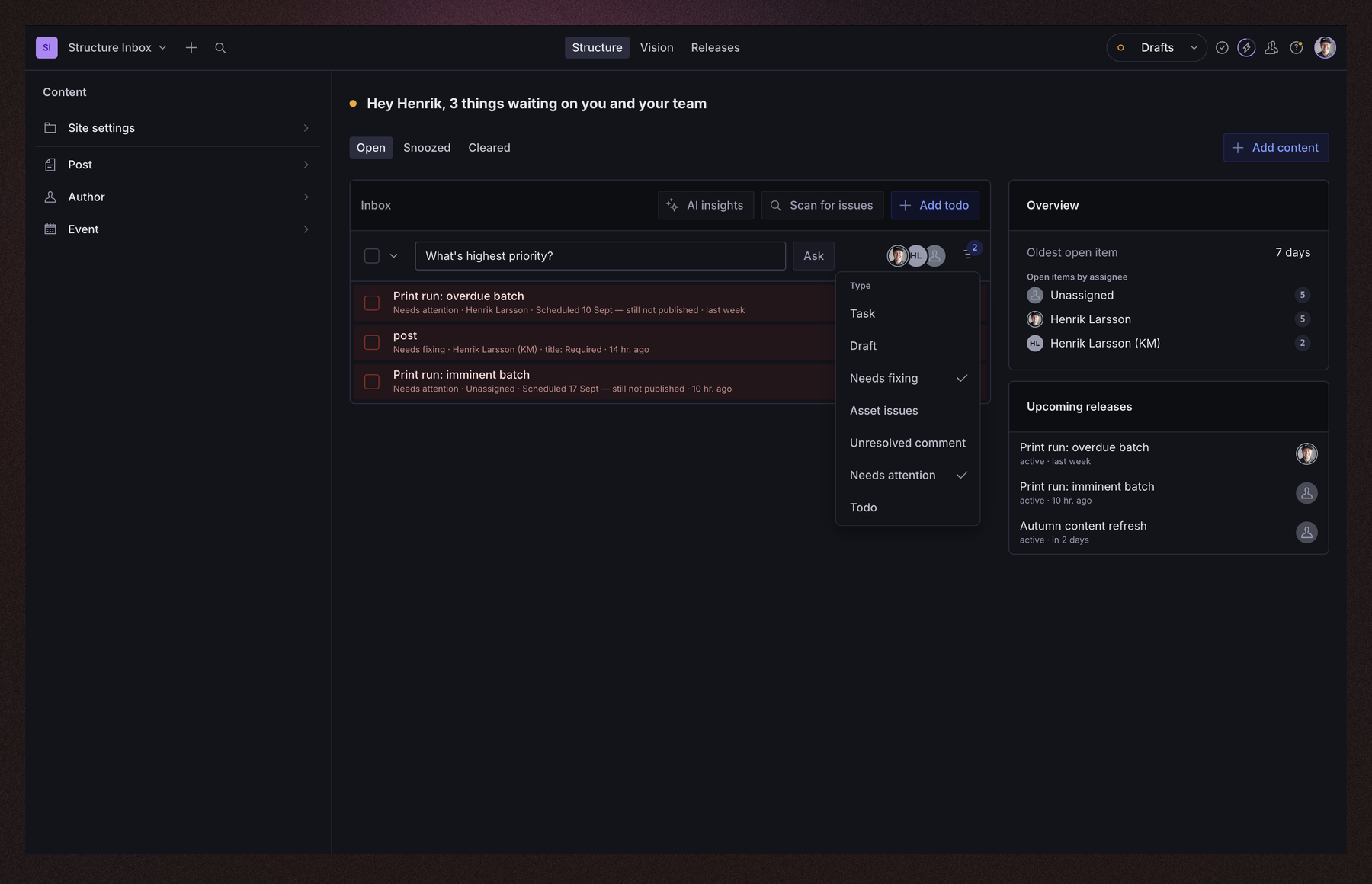
Two filters sit above the list, both display-only — neither changes what a source fetched, and nothing is resolved, snoozed or dismissed by filtering:
- By assignee — the avatar stack. Click a face to show only that person's items; click again to clear it. The headline count follows the filter, so it never disagrees with the list under it.
- By type — the funnel button, which only appears once more than one type is on screen. Pick any number of types; a small count badge on the button says how many are active.
Acknowledgments, snoozes and todos each live in their own small, unregistered per-editor document
(structureInbox.dismissals.<userId>, .snoozes.<userId>, .todos.<userId>) — plain, queryable
documents in your dataset, not hidden anywhere.
The current tab (Open/Snoozed/Cleared) and both filters live in the pane's own URL params, so reloading the page or opening the URL in a new tab — or sending it to someone — comes back to the same tab and filters, not the defaults. One limitation, stated plainly: pressing the browser's Back or Forward button changes the URL but not what's on screen while the pane stays mounted — only a fresh load re-reads it.
Recipe: a digest outside the Studio
These per-editor documents make a scheduled digest (a daily "here's what's open" email or Slack
message) a job for a Sanity Function — not
something this package ships, but buildDigest is exported to make writing one straightforward:
import {buildDigest, parseSnoozes} from 'sanity-plugin-structure-inbox/node'

const editors = await fetchEditorsWithParsedState(client) // your own fetch + parseSnoozes per editor
const sources = await fetchConfiguredSourceItems(client) // your own fetch, shaped as {name, items}[]

const digests = buildDigest(sources, editors)
// digests: {userId, open: InboxItem[]}[] — send however you'd like.
Recipe: cleaning up after a departed editor
The per-editor documents above persist forever once created. findStaleEditorDocuments diffs them
against your project's current membership so you can clean up orphaned ones on your own schedule:
import {EDITOR_DOC_TYPES, findStaleEditorDocuments} from 'sanity-plugin-structure-inbox/node'

const docs = await client.fetch(`*[_type in $types]{_id, _type}`, {types: EDITOR_DOC_TYPES})
const activeUserIds = await fetchCurrentProjectMemberIds() // your own fetch, e.g. Sanity's project members API

const staleIds = findStaleEditorDocuments(docs, activeUserIds)
// staleIds: string[] — delete however and whenever you like, e.g.:
// await client.delete({query: '*[_id in $ids]', params: {ids: staleIds}})
Why these two recipes import from /node
Both recipes above run outside a Studio, in a Node program with no DOM lib. The main entry point
necessarily carries @sanity/client's type graph, and @sanity/client ships an ambient
declare global {interface File {}}. In a Studio that is harmless — the DOM lib is always there and
the empty interface just merges into the real File. In a DOM-less tsconfig it is not: it injects
an empty global File where there was none, so const f: File = … quietly compiles instead of being
rejected. sanity-plugin-structure-inbox/node re-exports the same pure, dependency-free functions
with no ambient declarations and none of the React or Studio types a Node program has no use for.
Every symbol on /node is also still exported from the main entry point, and will stay that way —
this is a smaller door into the same room, not a migration you have to make.
Options
| Option | Type | Default | |
|---|---|---|---|
sources | InboxSource[] | [] | The feeds that fill the inbox, in order. |
title | string | localized Inbox | Title for the pane, and for its entry in the root list. |
toolName | string | 'structure' | Which structure tool to attach to. Set this when the Studio runs more than one. |
redirectOnLanding | boolean | true | Whether to open the Inbox when an editor lands on the tool with nothing selected. Never fires on a narrow viewport — see below. |
ask | boolean | false | Lets an editor select rows by asking a plain-language question. See below. |
contentGaps | object | off | Enables the "Find content gaps" AI read. See below. |
context | string | — | Project description prepended to every AI read. See below. |
summarize | boolean | true | Set to false to remove the "Summarize" AI read entirely — no menu item, no cost. |
suggestTodos | boolean | true | Set to false to remove the "Suggest todos" AI read entirely — no menu item, no cost. |
i18n | {languages?, languageField?} | Studio locale, 'language' | How localized content is read: which language to prefer, and which field marks a document-level translation. See Localized content. |
Getting back to the Inbox
An "Inbox" entry goes at the top of the root list, above a divider. Use inboxListItem to put it
somewhere else instead — the plugin spots a hand-placed entry and does not add a second one:
import {inboxListItem} from 'sanity-plugin-structure-inbox'

structureTool({
  structure: (S) =>
    S.list()
      .title('Content')
      .items([...S.documentTypeListItems(), S.divider(), inboxListItem(S)]),
})
On a wide layout editors also land on the Inbox without clicking anything, and clicking the tool in the navbar returns them to it.
On a phone
Below 640px the structure tool shows one pane at a time, and only the last one — so opening the
Inbox automatically there would hide the root list behind a pane and leave the rest of your
structure unreachable. The landing redirect is skipped at that width regardless of
redirectOnLanding: editors land on the root list like they would in a stock Studio, and tap the
Inbox entry to open it. The pane grows a back button of its own at that width, so a bookmark
straight to it is not a dead end either.
This is why the Inbox entry is not optional. A structure is serialized once, before any viewport is known, so the entry cannot be added for narrow screens alone.
AI features, and what they cost
Every source, assign/transfer, resolve/acknowledge/snooze, and both digest recipes work with
zero AI and zero Sanity Agent Actions usage — the pane is fully useful with no AI configured at
all. AI is additive on top of that, never required:
| Feature | Where | Default | Triggered by |
|---|---|---|---|
Ask AI (assess) | Per row, on unpublishedDrafts | — | Explicit click |
Suggest a time (suggestSnooze) | Per row, on unpublishedDrafts | — | Explicit click |
| Summarize | Pane-wide | On | Explicit click |
| Suggest todos | Pane-wide | On | Explicit click |
Ask (ask: true) | Pane-wide | Off | Explicit click, per question |
Find content gaps (contentGaps: {}) | Pane-wide | Off | Explicit click |
Fix with AI (proposeFix) | Per row, on linkCheckerFindings | — | Explicit click, then Apply |
Every one of these is click-triggered, never automatic — nothing fires just from selecting a row or opening the pane, and every handler is guarded against a rapid double-click firing twice.
Sanity bills Agent Actions at a flat $0.05 per request, regardless of document or prompt size —
cost scales with how many times editors click these buttons, not with how many documents or how
much content you have. summarize/suggestTodos are on by default since they're cheap and
low-friction; turn either off (see Options) for a config-level guarantee of zero spend
from that read, regardless of what an editor clicks.
Bulk actions never spend anything. The selection bar's "Quick fix" only applies fixes the plugin can compute itself — filling a portrait's alt text from its own document, stripping a confirmed-dead URL — and skips the rest, saying so ("2 fixed · 1 needs review"). Selecting twenty rows and clicking once cannot become twenty billable calls.
Agent Actions cannot see images. Its instructionParams accept constant, field, document
and groq — there is no image input, and the image-related Agent Actions docs are about
generating images, not reading them. So this plugin ships no built-in "describe this photo": a
fallback that guessed alt text from the document's text would write confident, wrong descriptions,
and a wrong alt text is worse than a missing one because nothing flags it again. Bring your own
vision model instead, via assetIssues's describeImage — see Alt text.
What leaves your dataset on an AI read
Every AI read in this plugin goes to Sanity Agent Actions, in your own project, over the editor's own client. No third-party model provider is involved, and nothing is sent until someone clicks. What differs between the reads is how much of your content goes with the click.
Ask and Find content gaps: a project survey
These two share one cached survey. It covers up to 30 document types (schema order — a project with more only has its first 30 included), and for each type it sends:
- the type's name and title,
- its document count,
- its schema
description, if you wrote one, - which other document types it references, by title,
- and up to 5 real field values, stride-sampled across that type's 100 most recently updated documents.
Those 5 values all come from one field, chosen by name: the type's title, else its name,
else its label. The match is exact and case-insensitive — the same coalesce(title, name, label)
convention this plugin's own row titles already use.
A type with none of those three fields sends no field values at all. Its name, count,
description and references still go; its content does not. A lead type whose fields are email,
phone and message therefore contributes zero real values, even though all three are strings.
This is deliberate: there is no fallback to "the first string field", because on exactly that kind
of type the first string field is the one you would least want read aloud to a model.
Nothing else from your documents is sent on these reads — no other field, no body text, no
document ids, no asset urls. The worst case is 30 types × 5 values = 150 short strings, plus
30 schema descriptions, plus your context string.
Summarize and Suggest todos: the visible list
These send the pane's own rows, not the documents behind them: for up to 30 open rows, the row's
title and subtitle — the same two lines the editor is already looking at. Ask additionally
sends each row's source name, document type, waiting-since timestamp and assignee label; that list
is the DescribedRow shape in src/ai/askInbox.ts, kept deliberately narrow because every field
in it is a field that leaves the dataset.
The per-row reads: one whole document
Ask AI (assess), Suggest a time (suggestSnooze) and Fix with AI (proposeFix) do
not send a field list. They pass Agent Actions a document reference
({type: 'document', documentId}) and Sanity resolves that document server-side, inside your
project — so the model sees the document, and this plugin does not choose which of its fields.
That is the right shape for a read whose whole job is judging one document an editor explicitly
picked, but it means field selection is not the control here. If a document type should not be read
by a model at all, turn the feature off instead: unpublishedDrafts({ai: false}) removes both
per-row buttons from that source, and the Options above remove the pane-wide reads.
Grounding AI reads in your project
structureInbox({
  context: 'A design agency site — services, case studies, and a blog.',
  sources: [
    /* ... */
  ],
})
context is optional prose describing your project's business or positioning, prepended to every
pane-wide AI read (Summarize, Suggest todos, Ask, Find content gaps) — not per-row reads like
Ask AI, which already ground themselves in one concrete document. Keep it short, concrete, and
stable (business model, terminology) rather than anything that goes stale (a current campaign) —
outdated context actively misleads.
To keep it out of sanity.config.ts itself, load it from a file — Sanity Studio runs on Vite, so a
plain ?raw import works:
import projectContext from './project-context.md?raw'

structureInbox({context: projectContext, sources: [/* ... */]})
Turning off Summarize or Suggest todos (see above) removes the menu item entirely, so no request is ever sent:
structureInbox({summarize: false, suggestTodos: false, sources: [/* ... */]})Assets
Where an asset row takes you
The reporting is unconditional. The destination depends on what your Studio has.
Every asset row always tells you the same things — what the file is, how big it is, which ceiling it tripped, and how many documents use it. That part needs no plugin and no configuration.
Where clicking it goes is the first of these that exists:
- your own
openAssetcallback, if you passed one - a media-browsing tool registered in the workspace (
sanity-plugin-mediaand friends), detected at runtime — this plugin depends on none of them - the file itself, opened in a new tab
Rung 2 can only ever open that tool's own root, never the specific asset — no media browser
plugin exposes a route or query param an outside caller can address for this. So it also copies
the asset's filename to the clipboard and shows a toast telling you what to do with it: paste it
into the tool's own search to find the file, then use its Replace to swap in a smaller one
(or, for an unused asset, delete it there instead — there's nothing to replace it with). If the
clipboard write fails or the browser has no Clipboard API, the toast falls back to naming the
filename to search for by hand; either way, navigation to the tool still happens. Passing your own
openAsset takes over this rung entirely — no clipboard, no toast.
This is deliberate rather than a limitation we grew into. Sanity assets are immutable: an
asset's _id contains a hash of its bytes (image-eb94b14e…-1408x768-jpg), so there is no
"replace this file" operation anywhere in Sanity — not in core, not in the media plugin. What the
media plugin calls Replace is a reference migration: it points every document at a different
asset, image assets only, and warns that it may take minutes.
So this source reports, and hands you to whichever surface your Studio actually has for acting:
| Media plugin installed | No media plugin | |
|---|---|---|
| See every asset, its usage, delete it | its own tool | only via an image/file field's Select dialog |
| Point all documents at another asset | Replace (images only) | not available anywhere |
| Swap one field's image | field Upload/Select | field Upload/Select |
Without a media plugin, Sanity's own asset management lives inside a document field's Select
dialog — which does include Show usage and Delete per asset. If your editors work with
assets often, installing sanity-plugin-media
is the honest recommendation; this plugin will find it and use it automatically.
To route these rows somewhere else entirely — Sanity's Media Library, or an asset browser this plugin has never heard of:
assetIssues({
  openAsset: (asset) => {
    // asset: {id, type, url?, filename?, size}
    window.open(`https://my-asset-admin.example.com/${asset.id}`, '_blank')
  },
})
What counts as oversized
Size ceilings are per kind of media, because they are not comparable numbers: 4 MB is an alarming JPEG, an unremarkable PDF and a short podcast episode.
| Kind | Matches | Default |
|---|---|---|
image | sanity.imageAsset | 5 MiB |
pdf | application/pdf | 15 MiB |
audio | audio/* | 30 MiB |
video | video/* | 200 MiB |
other | any other file — archives, documents, fonts | 25 MiB |
assetIssues({
  maxSizeBytes: {
    image: 2 * 1024 * 1024, // stricter than default
    pdf: 25 * 1024 * 1024, // print-ready PDFs are legitimately heavy
  },
})
Anything you leave out keeps its default. A plain number still works and applies one ceiling to every kind:
assetIssues({maxSizeBytes: 10 * 1024 * 1024})Each row names the kind it tripped — "Oversized image", "Oversized PDF", "Oversized audio" — so it is clear which ceiling applied.
Subtitles divide by 1024, so a decimal threshold reads a little oddly: set 10_000_000 and a file
just over it prints as 9.5 MB. Use MiB multiples if you want the row to match your config.
Which asset types this covers
Sanity's dataset has exactly two asset document types, and assetIssues reads both:
sanity.imageAsset— images.sanity.fileAsset— everything else. A PDF, an MP3, an MP4, a zip and a font are all file assets; onlymimeTypetells them apart, which is why the ceilings above key off it rather than off the document type.
There is no sanity.audioAsset, and no dataset video asset type: sanity.videoAsset exists but
belongs to Sanity's Media Library, a separate resource
this source cannot see (see the limitation above). So "all default file types" is already covered —
by sanity.fileAsset — and the work is in judging them by the right ceiling.
Alt text
assetIssues reports four things, two of them about alt text: an image field with no alt text at
all, and one whose alt text doesn't pull its weight (it repeats the filename, it's a generic word
like "image", or it's too short to describe anything).
Missing alt text is also the one finding this plugin can fix for you. For an image that depicts its own document's subject — an author's portrait, a product's pack shot — the correct alt text is already in the document: its title. Declare those fields and the row gains a one-click Quick fix, free and instant, applicable to a whole selection at once:
assetIssues({
  altFromTitle: ['author.portrait', 'product.packShot'],
})'<documentType>.<fieldName>', and declared rather than guessed on purpose: an article's hero image
is not a picture of its headline, and a wrong alt text is worse than a missing one because nothing
flags it again. A document with no title of its own is skipped rather than given its _id.
The title is written verbatim, with no "Photo of" / "Porträtt av" prefix. Assistive technology
already announces that it's an image, so a prefix is redundant — alt="Daniel Vaziri" is both
simpler and more correct than alt="Portrait of Daniel Vaziri". If you want one anyway, or any other
rule, suggestAlt takes the decision over completely:
assetIssues({
  suggestAlt: ({documentType, title}) =>
    documentType === 'author' && title ? `Porträtt av ${title}` : null,
})
Return null for "no safe answer here" and that row stays a plain link. suggestAlt must be
synchronous and free — it's what the bulk action applies, so it can't do I/O — and a null from it
is a decision, not a fall-through: it wins over altFromTitle.
For everything else — a hero image, an illustration, anything whose alt text needs eyes on the
actual picture — supply describeImage and back it with your own vision model:
assetIssues({
  altFromTitle: ['author.portrait'],
  describeImage: async ({imageUrl, documentType, fieldName, title}) => {
    const res = await fetch('/api/describe-image', {
      method: 'POST',
      body: JSON.stringify({imageUrl, documentType, fieldName, title}),
    })
    return (await res.json()).alt ?? null
  },
})
imageUrl arrives width-capped so you're not paying to send a full-resolution original, and
documentType/fieldName let you prompt differently per kind of image. It runs only when an
editor clicks "Fix with AI" on one specific row — never on render, never on selection, and never
from the bulk action. Without it, rows outside altFromTitle/suggestAlt simply aren't fixable.
Either way the proposal is shown before anything is written, and the patch runs only when the editor clicks Apply. Poorly-worded existing alt text is deliberately not fixable: filling an empty field can't destroy what someone wrote, and replacing one can.
A localized alt field (sanity-plugin-internationalized-array) is checked too. It counts as missing
when no language has any text, and its fix writes one entry, in the first of i18n.languages. Without
that option, such a row still shows up and opens the document, but offers no fix: the Studio's UI
language isn't a reliable guess for which language your content is in. Any other localized shape (a
localeString object, say) is read but never written. See Localized content.
Optional: broken links via sanity-plugin-link-checker
sanity-plugin-link-checker scans your
dataset for dangling references and dead external links. linkCheckerFindings() reads its report
as an Inbox source — imported from a separate entry point, so sanity-plugin-link-checker
(an optional peer dependency) is only required if you actually use it:
import {structureInbox} from 'sanity-plugin-structure-inbox'
import {linkCheckerFindings} from 'sanity-plugin-structure-inbox/link-checker'

export default defineConfig({
  plugins: [
    structureTool(),
    structureInbox({sources: [/* ...your other sources */, linkCheckerFindings()]}),
  ],
})sanity-plugin-link-checker's own linkChecker() Studio tool is not required — this integration
reads and runs scans directly from that plugin's headless engine. Add linkChecker() yourself only
if you also want its standalone panel or CLI.
By default only confirmed-broken links show up, not unverifiable ones (a browser-only check
without that plugin's Document Function deployed). Pass includeUnverifiable: true once that
Function is deployed, or if the noise is acceptable for your project.
Optional: asking about all your items
structureInbox({ask: true, sources: [/* ... */]})With ask on, a single-line "Ask about these items…" input appears in the Open view. Type a
plain-language question and AI selects which on-screen rows match it — a selection only, never a
resolve/dismiss/snooze on your behalf. Off by default: it spends an Agent Actions request per
question, and needs Agent Actions available in the Studio. Ask runs the same project-wide survey
contentGaps (below) is built on, regardless of whether contentGaps is enabled — when both are
on, the survey is shared and short-TTL-cached (5 minutes) between the two, so asking a question
right after finding content gaps (or vice versa) doesn't survey your dataset twice.
Optional: finding content gaps
structureInbox({
  contentGaps: {},
  context: 'A design agency site — services, case studies, and a blog.',
  sources: [/* ... */],
})
With contentGaps configured, a Find content gaps button appears next to Summarize. It surveys
every real document type in your schema and asks AI what looks missing given what's actually
there. context matters most here of any read in this pane. This is a judgment call, not a fact
(unlike every other source), and the heaviest read in the pane — off by default for both reasons.
Read-only: there's no "draft this for me" yet.
How it works
The plugin registers a studio.components.activeToolLayout override that redirects an editor
landing on the tool's root pane to the Inbox pane's id, then wraps the root's child resolver so
that id actually resolves. It stands aside on a deep link, mid-intent, or in tools it's not
attached to.
Limitation: a structure resolver that returns an observable can't be extended this way — rare, but if you do, the plugin warns and disables the redirect rather than sending editors to a URL that resolves to nothing.
Localized content
Field-level localization works without any setup. A title stored by
sanity-plugin-internationalized-array
([{_key, language, value}]), a localeString-style object ({en, sv}), or Portable Text is read
as plain text. Every row title goes through this, including the ones from your own sources.
By default, a localized value is read in the editor's Studio locale (sv-SE, then sv), and
otherwise in whichever language the document has. If your content language differs from your
Studio's UI language, set the order yourself:
structureInbox({
  i18n: {languages: ['sv', 'en']},
  sources: [/* ... */],
})
The first language in that list is also the one localized alt-text fixes write in. Leave it unset and those fixes aren't offered (see Alt text).
Document-level translation (@sanity/document-internationalization)
also works without setup. Each translation is its own document, so the translations of one page
would otherwise show up as identical rows. Instead, each row gets a small language badge (SV, EN),
and once two or more languages are present, the filter menu gains a Language group. It chooses
between translations: rows that aren't in any one language (tasks, comments, field-level-localized
documents) stay visible, so filtering never hides work. The filter is saved in the pane's URL along
with the others. Only document types whose schema declares the
language field are read (language, or set i18n.languageField to match your plugin config; false
turns it off). A Studio without document-level translation sees no difference.
This covers unpublishedDrafts, documentValidation and assetIssues. Tasks and comments don't
fetch the document they're about, so their rows have no language. Your own sources can set
language on an item to get the same badge and filter.
Neither unpublishedDrafts nor documentValidation lists system types (sanity.*) or
@sanity/document-internationalization's own translation.metadata documents unless you name them in
types.
A row that still can't be rendered is replaced by a short "Couldn't display this item" line. The rest of the inbox, and the Structure tool around it, keep working.
Localization
Strings live under the structureInbox i18n namespace. Override any of them by registering a bundle
with that namespace in your own sanity.config.ts:
import {defineLocaleResourceBundle} from 'sanity'

i18n: {
  bundles: [
    defineLocaleResourceBundle({
      locale: 'sv-SE',
      namespace: 'structureInbox',
      resources: {'inbox.title': 'Start'},
    }),
  ],
}
API reference
Most of what's published is covered above, next to the feature it belongs to. The rest — exported but never named in prose so far — is documented here: what it is, and why (or whether) an integrator would touch it.
SectionCard / SectionCardProps — the boxed card an aside source's
items render inside. It is not the general wrapper it looks like: main
sources render through MergedList, which merges their items into one list
and draws its own card, so SectionCard survives only on the aside column
and in the error fallback when an aside source throws. It is exported, but
is internal render plumbing rather than a building block for a custom source:
nothing in "Writing your own" above asks you to render one directly, and its
error-state strings call useTranslation against this plugin's own
structureInbox i18n namespace — render it outside a Studio where that
namespace is loaded (i.e. outside this plugin's own tree) and those strings
come back untranslated. SectionCardProps is exported alongside it only so a
wrapper around it can be typed.
CreateItemInput — the payload an InboxSource's optional create and
update callbacks receive (InboxSource.create, .update). If your source
lets an editor add or edit a row from the Inbox itself, this is the shape
your handler is handed; exported so those handlers can be typed outside this
package.
useAssignmentStore, assignmentDocId, AssignmentStore — the shared
store behind "Assign to…" (see "Selecting and acting"): a live map of
structureInbox.assignment documents for one docType, keyed by a hashed
target id (assignmentDocId), plus the assign/unassign mutations
(AssignmentStore). They are exported with no documented integration use
case — a custom source that wants its own delegation could reuse them, but
that isn't a recipe this README currently walks through. Flagged as a
removal candidate for a future major version (see plans/README.md's "Known
findings with no plan yet") rather than invented a use for here.
AssetTarget — the shape of the object assetIssues' openAsset
callback receives ({id, type, url?, filename?, size}), used in "Where an
asset row takes you" above. Exported so a custom openAsset handler, or a
wrapper around one, can be typed.
suggestAltText, AltContext — the function behind the Alt text
card's AI suggestion (see "Alt text" above) and the surrounding-context
shape it sends to Agent Actions. suggestAltText is @internal: it is
exported for its own unit test, not as a documented extension point — the
supported way to influence it is the altFromTitle / suggestAlt callbacks
on assetIssues, not calling it directly.
parseDismissals, isDismissed, parseTodos, parseAssessments —
pure, dependency-free readers for the plugin's other per-editor documents
(structureInbox.dismissals.<userId>, .todos.<userId>,
.assessments.<userId>), the same family parseSnoozes belongs to in
"Recipe: a digest outside the Studio" above. Useful for the same reason:
reading an editor's acknowledged/todo/cached-assessment state outside a
Studio, with no React and no live client needed. isDismissed additionally
answers whether a given item is still considered dismissed, honoring the
"an edit afterwards un-dismisses it" rule described in "Selecting and
acting".
Develop & test
The repo ships a test Studio as an npm workspace.
npm install
cp test-studio/.env.example test-studio/.env   # then fill in a project id
npm run build                                  # required — see below
npm run dev                                    # http://localhost:3333
The test Studio consumes the plugin's dist/, not src/, so a source change is invisible until
you rebuild. For a tighter loop, run npm run link-watch in one terminal and npm run dev in
another.
Other scripts: npm test, npm run lint, npm run format, npm run typecheck.
License
MIT © Henrik Larsson