Sanity logosanity.ioAll Systems Operational© Sanity 2026
Change Site Theme
Sanity logo

Documentation

    • Overview
    • Platform introduction
    • Next.js quickstart
    • Nuxt.js quickstart
    • Astro quickstart
    • React Router quickstart
    • Studio quickstart
    • Build with AI
    • Content Lake
    • Functions
    • APIs and SDKs
    • Agent Actions
    • Visual Editing
    • Blueprints
    • Platform management
    • Dashboard
    • Studio
    • Canvas
    • Media Library
    • App SDK
    • Content Agent
    • HTTP API
    • CLI
    • Libraries
    • Specifications
    • Changelog
    • User guides
    • Developer guides
    • Courses and certifications
    • Join the community
    • Templates
Help articles
Overview

  • Array items resolve to same JSON type
  • Studio Performance Issues Caused by legacy HTTP protocols
  • Error: Value of type "object" is not allowed in this array field
  • AVIF
  • Experimental feature: Spaces
  • Client API CDN configuration
  • Total attribute count exceeds limit
  • Desk is now Structure
  • Invalid configuration for cross dataset reference
  • Missing or duplicate context error
  • Sanity Studio v2 is deprecated
  • React Compiler and Sanity
  • Specify API version for studio client
  • Why give schema types a title?
  • Array type has a invalid value for property "of"
  • React 19 and Sanity
  • Schema: Lift anonymous object types
  • Reference type has a invalid value for property "to"
  • Incorrect location for reference options
  • Invalid part syntax
  • Asset metadata field
  • Warning: userStore.currentUser is deprecated
  • CLI errors
  • Renamed plugin sanity-plugin-vision
  • Part name format
  • Array member type name is the same as a global type
  • Changes in block schema customization properties
  • How to migrate from date to richDate
  • Invalid shape of predefined choices
  • JS Client: Promise Polyfill
  • Introducing the document type
  • Unable to get a ref to an input component
  • Authenticating the CLI when running remotely
  • Outdated modules
  • Upgrade studio packages
  • Block Content rendering: Image materializing
  • Structure: Document schema type required
  • Parts: Declare vs implement
  • Incorrect options declaration in reference
  • Block type cannot be used outside of array
  • Structure: Node ID required
  • Structure: List items must be an array
  • Installing Node.js
  • Structure: Action or intent required
  • Object type has a invalid value for fields
  • `studioHost` and `externalStudioHost` properties deprecated
  • Schema type is ES Module but imported through require
  • Structure: Invalid list item
  • Structure: Query provided where filter is expected
  • Structure: List item IDs must be unique
  • Given type name is a reserved type
  • Structure: Schema type not found
  • API versioning
  • Migrating the legacy webhook behavior to GROQ-powered Webhooks
  • Schema type is invalid
  • Input component is missing a required prop
  • Structure: Title is required
  • Structure: Filter is required
  • Import: Asset file does not exist
  • Input component is missing a required method
  • Implementing non-overridable part
  • Structure: Item returned no child
  • How to migrate your block text schema for the new definition of inline objects
  • Structure: Schema type is required
  • How to migrate from blocks spans to block children
  • Array type cannot contain array member
  • Using tokens in the browser
  • GraphQL
  • Array member type name conflicts with built-in type
  • Source vs. compiled paths
  • Import: Asset has different target than source
  • Using global studio client without specifying API version
  • Structure: Action and intent are mutually exclusive
  • Upgrade React
  • Plugin is missing a sanity.json file
  • Structure: Document ID required
  • Incompatible combination of params and filter
  • Using listener with tokens is not supported in browsers
  • Schema type is missing a required property
  • API versioning in Javascript Client
  • Upgrade version of studio package
  • Slug: `slugifyFn` renamed
  • Renamed plugin @sanity/date-input
  • Specify API version when using custom document list filters
  • Migration Cheat Sheet: Studio v2 to v3
  • Migrating from Studio v2
  • Function Timeout
  • Functions rate limit
  • Configure TypeGen
  • Studio v3 to v4
  • Email addresses show [email protection]

On this page

Previous

Structure: Schema type is required

Next

Array type cannot contain array member

Was this page helpful?

On this page

  • Update your frontend modules to support both the new and the old format
  • Update schema
  • Migrate your data
  • Update your studio
  • Technical details
Help articlesLast updated May 15, 2025

How to migrate from blocks spans to block children

We are resolving a few issues with the way block content is structured. Unfortunately, this is a breaking change and will thus require a migration. There are a couple of steps involved:

Update your frontend modules to support both the new and the old format

There are a couple of official ways of rendering block content - if you have a Javascript app and are using block-content-to-react or block-content-to-html, please upgrade those to the latest versions. If you are using the PHP client, update that to the latest version.

Update schema

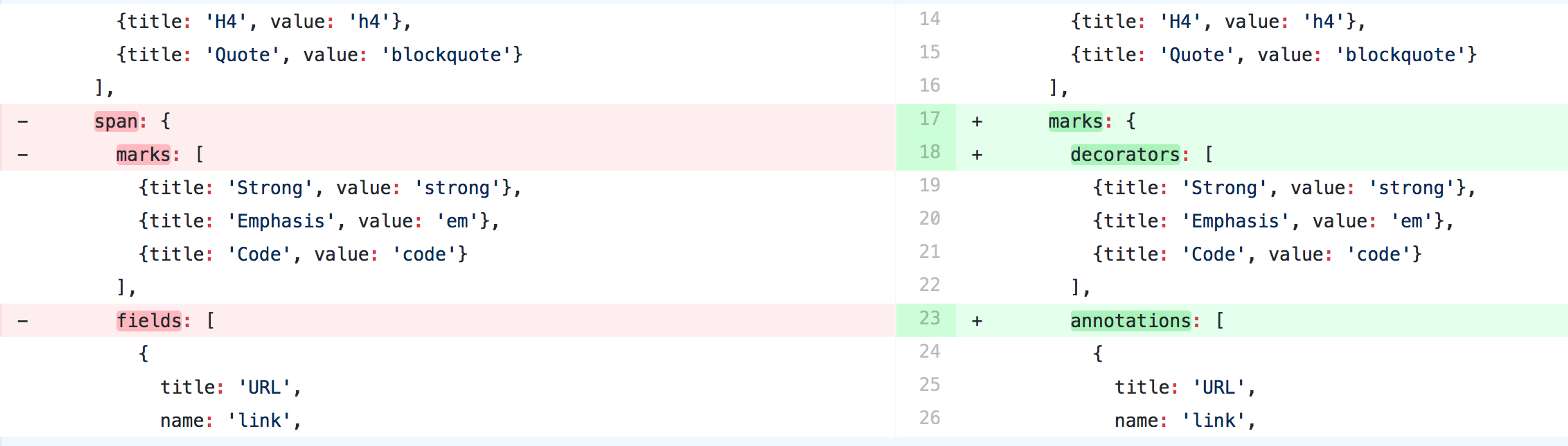
Unless you have customized the block type within your schema, you shouldn't have to do anything. However if you have customized it with allowed marks, or special rules for the span, you must ensure that the block type schema definition has the following new structure:

Loading...

See the updated block and span documentation for more information.

Migrate your data

All documents containing one or more block fields must be migrated to the new structure. We have written a script that does this automatically for you. This can be executed with the command line tool npx , which has been shipping with npm from version 5.2.0:

cd <your sanity studio project folder>
npx -p sanity-io/migrations block-spans-to-children
cd <your sanity studio project folder>
pnpm dlx -p sanity-io/migrations block-spans-to-children
cd <your sanity studio project folder>
yarn dlx -p sanity-io/migrations block-spans-to-children
cd <your sanity studio project folder>
bunx -p sanity-io/migrations block-spans-to-children

Update your studio

Run sanity upgrade in your studio to get the latest modules which includes a new version of the block editor. Running this new version without first migrating your data will yield a warning telling you that data needs migration.

Technical details

Note: This isn't mandatory reading unless you want to understand the changes to the data structure.

Previously, blocks had a key named spans which we're renaming to children. This is more in line with how most people think of nodes within their data model. We're also changing the way rich marks are represented. Instead of simply being attributes on each child, they are now pointers to a mark definition on a per-block basis. This helps to prevent duplication of data and also makes it easier to nest nodes in trees.

Old structure:

{
  "_key": "d3bf4f7519f3",
  "_type": "block",
  "style": "normal",
  "spans": [
    {"_type": "span", "marks": ["em"], "text": "Headless CMS?"},
    {"_type": "span", "marks": [], "text": " Check out "},
    {"_type": "span", "marks": [], "text": "Sanity", "link": {"href": "https://sanity.io"}},
    {"_type": "span", "marks": [], "text": ", it's pretty neat"}
  ]
}

New structure:

{
  "_key": "d3bf4f7519f3",
  "_type": "block",
  "style": "normal",
  "markDefs": [{
    "_type": "link",
    "_key": "someKey",
    "href": "https://sanity.io"
  }],
  "children": [
    {"_type": "span", "marks": ["em"], "text": "Headless CMS?"},
    {"_type": "span", "marks": [], "text": " Check out "},
    {"_type": "span", "marks": ["someKey"], "text": "Sanity"},
    {"_type": "span", "marks": [], "text": ", it's pretty neat"}
  ]
}
cd <your sanity studio project folder>
npx -p sanity-io/migrations block-spans-to-children
cd <your sanity studio project folder>
pnpm dlx -p sanity-io/migrations block-spans-to-children
cd <your sanity studio project folder>
yarn dlx -p sanity-io/migrations block-spans-to-children
cd <your sanity studio project folder>
bunx -p sanity-io/migrations block-spans-to-children
cd <your sanity studio project folder>
npx -p sanity-io/migrations block-spans-to-children
cd <your sanity studio project folder>
pnpm dlx -p sanity-io/migrations block-spans-to-children
cd <your sanity studio project folder>
yarn dlx -p sanity-io/migrations block-spans-to-children
cd <your sanity studio project folder>
bunx -p sanity-io/migrations block-spans-to-children
{
  "_key": "d3bf4f7519f3",
  "_type": "block",
  "style": "normal",
  "spans": [
    {"_type": "span", "marks": ["em"], "text": "Headless CMS?"},
    {"_type": "span", "marks": [], "text": " Check out "},
    {"_type": "span", "marks": [], "text": "Sanity", "link": {"href": "https://sanity.io"}},
    {"_type": "span", "marks": [], "text": ", it's pretty neat"}
  ]
}
{
  "_key": "d3bf4f7519f3",
  "_type": "block",
  "style": "normal",
  "markDefs": [{
    "_type": "link",
    "_key": "someKey",
    "href": "https://sanity.io"
  }],
  "children": [
    {"_type": "span", "marks": ["em"], "text": "Headless CMS?"},
    {"_type": "span", "marks": [], "text": " Check out "},
    {"_type": "span", "marks": ["someKey"], "text": "Sanity"},
    {"_type": "span", "marks": [], "text": ", it's pretty neat"}
  ]
}