AI translations that follow your terminology
- AI translation tools sound fluent but break product names, ignore style rules, and can't tell a reference field from a text field
- This guide shows how to fix that: store your glossary, style guide, and do-not-translate rules as structured content, then feed them to the Agent API at translation time
- Includes an eval framework to prove the quality difference before anything goes live

Noah Gentile
Principal Solution Architect at Sanity

John Siciliano
Senior Technical Product Marketing Manager

Knut Melvær
Principal Developer Marketing Manager
Published:
Localization teams spend weeks coordinating translations across agencies, spreadsheets, and disconnected tools. When they try AI instead, the output sounds fluent but breaks product names, ignores style conventions, and can't tell a reference field from a text field.
This guide shows how to fix that: store your translation rules as structured content in Sanity, then feed them to the Agent API at translation time.
This isn't a step-by-step tutorial. It's a guide to the implementation patterns that Sanity makes possible for AI-powered translations. You'll find links to relevant docs and starters when you're ready to try it yourself.
Translation is one of the highest-volume, most repetitive content operations teams run. It's exactly the kind of work Sanity is built to automate: structured content that AI can process at the field level, with human review before anything publishes.
For technical leaders: The structured metadata approach means your localization team maintains terminology in Studio, no developer involvement for glossary updates. The Agent API handles bulk translation. Human review happens in Studio before anything publishes. Compare this to a TMS contract: you get the same terminology control, faster turnaround, and no per-word fees. The tradeoff is setup time and the experimental API status noted below.
What you'll get
- Translations that use your approved terms, not whatever the model invents
- Per-locale style control (formal German, casual French, preserved English product names when translated to Japanese)
- Bulk translation across your content catalog with one script
- A measurable quality difference you can prove with the included eval framework
- A working starter kit you can install in 5 minutes
Who this is for
Developers building localization workflows and the technical leaders evaluating whether AI translation can work for their content operations.
Why AI translations break without structured metadata
You pasted your content into an AI tool. The translations sounded fluent. Then you noticed: it translated "Next.js" into French as "Suivant.js." It turned your formal German copy into casual "du" form. It transliterated "Releases" into Japanese Hiragana instead of keeping the product name.
The output sounded like a translation. But it broke your terminology, ignored your style rules, and didn't know which words to leave alone.
This isn't an AI quality problem. Enterprise translation management systems solved it years ago with structured metadata: glossaries, style guides, do-not-translate lists, locale-specific rules. The problem is that AI translation tools don't have access to any of that context. That is what we want to fix.
This guide shows how to store that metadata as structured content in Sanity and feed it to the Agent API at translation time. The result: translations that use your approved terms, match your tone per locale, and leave product names alone.
What you'll use
Here are the parts of the Sanity platform that make AI-powered translation workflows possible:
- Agent API:
client.agent.action.translate()withstyleGuideandprotectedPhrasesparameters. Schema-aware: it knows which fields to translate, which to skip, and how to handle references. - Structured translation metadata: Glossary entries, style guides, and locale definitions stored as Sanity documents. Editors maintain them in Studio. The translation system reads them at runtime.
- Content Releases: Bundle translated content across locales, preview together, publish when ready.
- Content Agent: Use it in Studio to generate a starter glossary from your existing content. It scans your documents for brand terms, product names, and recurring phrases. Your localization team refines the output. Getting to 80% glossary coverage takes minutes instead of days.
What you’ll do
Store translation glossaries and style guides as structured content. Assemble them into translation prompts automatically. Translate documents with the Agent API. Measure the quality difference with evals. Review everything in Studio before publishing.
Store glossaries and style guides as structured content
Enterprise TMSs have a concept called a "termbase": a structured database of approved terminology with translations per language, usage rules, and do-not-translate flags. The starter builds this as Sanity documents.
Three document types do the work here.
Glossary entries
Each glossary entry stores your approved terminology:
// Each glossary entry: a term with translations, rules, and context
{
  _type: 'glossaryEntry',
  term: 'Portable Text',
  status: 'approved',        // approved | forbidden | provisional
  doNotTranslate: true,       // keep in original language
  partOfSpeech: 'noun',
  definition: 'Sanity\'s rich text format',
  context: 'Always keep as English product name',
  translations: [
    {
      locale: { _ref: 'locale-fr-FR' },
      translation: 'Portable Text',  // DNT: same as source
    },
    {
      locale: { _ref: 'locale-de-DE' },
      translation: 'Portable Text',  // DNT: same as source
    }
  ]
}
Style guides
Style guides define tone and conventions per locale:
{
  _type: 'translationStyleGuide',
  locale: { _ref: 'locale-de-DE' },
  formality: 'formal',           // formal | informal | neutral
  tone: ['professional', 'precise'],
  additionalInstructions: 'Use "Sie" (formal address). Use gender-inclusive language. Avoid unnecessary anglicisms where good German alternatives exist.'
}
Locale definitions
Locale definitions are your BCP-47 language tags with metadata:
{
  _type: 'translationLocale',
  code: 'ja-JP',
  title: 'Japanese (Japan)',
  direction: 'ltr',
}
Content editors maintain all of this in Studio. No developer involvement for terminology updates. When the marketing team decides "Workspace" should be "Arbeitsbereich" in German (not "Workspace"), they update the glossary entry. The next translation picks it up automatically.
Assemble metadata into translation prompts
You don't dump your entire glossary into every translation prompt. That would flood the context with irrelevant terms.
The starter's promptAssembly.ts does RAG-style filtering: it extracts all text from the source document, then only includes glossary entries whose terms actually appear in that text.
import {filterGlossaryByContent, buildTranslateParams} from './promptAssembly'

// Only inject glossary terms that appear in the source document
const relevantGlossaries = filterGlossaryByContent(glossaries, sourceDocument)

// Build the complete translation parameters
// schemaId '_.schemas.default' refers to your project's default schema —
// the one Sanity Studio uses. This is the right value for most projects.
const params = buildTranslateParams({
  schemaId: '_.schemas.default',
  documentId: sourceDoc._id,
  glossaries: relevantGlossaries,
  targetLocale: {code: 'fr-FR', title: 'French (France)', direction: 'ltr'},
  sourceLocale: {code: 'en-US', title: 'English (US)', direction: 'ltr'},
  styleGuide: frenchStyleGuide,
})
buildTranslateParams does several things under the hood:
- Assembles a style guide string from the glossary entries and style guide document. Approved terms get listed with their target translations. Forbidden terms get flagged. DNT terms get explicit "do not translate" instructions.
- Extracts protected phrases from DNT glossary entries. These go into the
protectedPhrasesAPI parameter as a hard constraint, separate from the style guide prompt. - Packages everything for
client.agent.action.translate().
The belt-and-suspenders approach matters: DNT terms appear in both the style guide (soft instruction) and protectedPhrases (hard constraint). The API parameter is the safety net. The style guide reinforces it in context.
Translate documents with the Agent API
One API call. With the Agent API, you get a draft with translated content that respects your schema, your glossary, and your style rules.
import {createClient} from '@sanity/client'

const client = createClient({
  projectId: '<your-project-id>',
  dataset: 'production',
  apiVersion: 'vX',
  token: '<editor-token>',
})

try {
  const response = await client.agent.action.translate({
    schemaId: params.schemaId,
    documentId: params.documentId,
    targetDocument: {operation: 'create'},
    fromLanguage: params.fromLanguage,
    toLanguage: params.toLanguage,
    styleGuide: params.styleGuide,
    protectedPhrases: params.protectedPhrases,
  })
  console.log('Translation created:', response.documentId)
} catch (error) {
  console.error('Translation failed:', error.message)
}
The Agent API creates a new draft document. References stay references. Numbers stay numbers. Slugs get localized. The styleGuide parameter controls terminology and tone. The protectedPhrases parameter prevents specific terms from being translated.
The draft doesn't publish. An editor reviews it first.
For testing without writing to the dataset, use noWrite: true:
const response = await client.agent.action.translate({
  schemaId: params.schemaId,
  documentId: params.documentId,
  targetDocument: {operation: 'create'},
  fromLanguage: params.fromLanguage,
  toLanguage: params.toLanguage,
  styleGuide: params.styleGuide,
  protectedPhrases: params.protectedPhrases,
  noWrite: true,  // returns translated content without creating a document
})

// response contains the translated content — inspect before committing
console.log(JSON.stringify(response, null, 2))
This is the pattern the eval framework uses. Translate, inspect the output, score it. No side effects.
Translate in bulk
For teams managing content across multiple locales:
import {createClient} from '@sanity/client'
import {filterGlossaryByContent, buildTranslateParams} from './promptAssembly'

const client = createClient({
  projectId: '<your-project-id>',
  dataset: 'production',
  apiVersion: 'vX',
  token: process.env.SANITY_TOKEN,
})

const untranslated = await client.fetch(`
  *[_type == "article" && language == "en-US"
    && !defined(*[_type == "article" && language == "es-ES"
      && references(^._id)][0])
  ]{_id, title}
`)

console.log(`Found ${untranslated.length} articles to translate`)

const results = { success: 0, failed: 0, errors: [] }

for (const doc of untranslated) {
  try {
    const relevant = filterGlossaryByContent(glossaries, doc)
    const params = buildTranslateParams({
      schemaId: '_.schemas.default',
      documentId: doc._id,
      glossaries: relevant,
      targetLocale: spanishLocale,
      sourceLocale: englishLocale,
      styleGuide: spanishStyleGuide,
    })

    await client.agent.action.translate(params)
    results.success++
    console.log(`Translated ${results.success}/${untranslated.length}: ${doc.title}`)
  } catch (error) {
    results.failed++
    results.errors.push({ id: doc._id, title: doc.title, error: error.message })
    console.error(`Failed: "${doc.title}":`, error.message)
  }
}

console.log(`Done: ${results.success} translated, ${results.failed} failed`)
Every result is a draft. Nothing publishes until an editor says so.
Measure translation quality with evals
Claims about translation quality are easy to make and hard to prove. The starter includes an eval framework that does both.
Three eval cases, each comparing translations with and without structured metadata:
Glossary compliance (French): Without context, the model translates "Dashboard" however it wants. With the glossary, it uses "Tableau de bord." Without context, "Workspace" becomes whatever sounds right. With the glossary, it's "Espace de travail."
Do-not-translate preservation (Japanese): Without context, "Portable Text" becomes "ポータブルテキスト" (katakana transliteration). "Perspectives" and "Releases" get the same treatment. With the glossary's DNT flags and protectedPhrases, they stay in Latin script.
Formality matching (German): Without context, the model defaults to informal "du" form. With the style guide specifying formal register, it uses "Sie" throughout and picks "Arbeitsbereich" for "Workspace" instead of leaving the English term.
Each eval runs two translations (with and without context), then scores both:
import {scorePrompt} from './scoring'
import {judgeTranslation} from './judge'
import {runBaselineComparison} from './model-scoring'

// Translate with and without metadata, score both, compute delta
const comparison = await runBaselineComparison(evalCase)

// comparison includes:
// - withContext: translation + deterministic scores + LLM judge scores
// - withoutContext: same, but no glossary/style guide
// - qualityDelta: the measurable difference metadata makes
//
// Deterministic scoring checks term presence/absence.
// LLM judge (Claude Haiku, 3 trials averaged) scores fluency,
// term accuracy, formality match, and preservation.
Run it yourself: npm run eval. The delta is the proof. Not a marketing claim. A measurable difference you can reproduce.
Find outdated translations with GROQ
Getting the first translation right is only half the work. Keeping translations in sync when source content changes is the ongoing challenge. GROQ handles this:
// Assumes translations reference their source document.
// Adapt the reference field to match your i18n setup
// (e.g., __i18n_base._ref for the document internationalization plugin).
*[_type == "article" && language == "es-ES"
  && _updatedAt < *[_type == "article" && language == "en-US"
    && references(^._id)][0]._updatedAt
]{
  title,
  _updatedAt,
  "sourceUpdated": *[_type == "article"
    && language == "en-US"
    && references(^._id)][0]._updatedAt
}
This finds Spanish translations where the English source was updated more recently. Run it on a schedule, pipe it into a dashboard, or trigger re-translation with the Agent API. No more "did we update the French version?" conversations.
Review and publish with Content Releases
Editors see translated drafts in Studio. They can compare source and translation side by side, edit specific fields, and bundle approved translations into a Content Release for coordinated publishing across locales.
The workflow: metadata informs the translation. The Agent API creates a draft. Editors review. Content Releases bundle. Nothing publishes without human approval.
This isn't "AI replaces translators." It's "AI drafts with the same context that professional translators expect."
How Content Agent turns metadata into translations
Here's why the approach works.
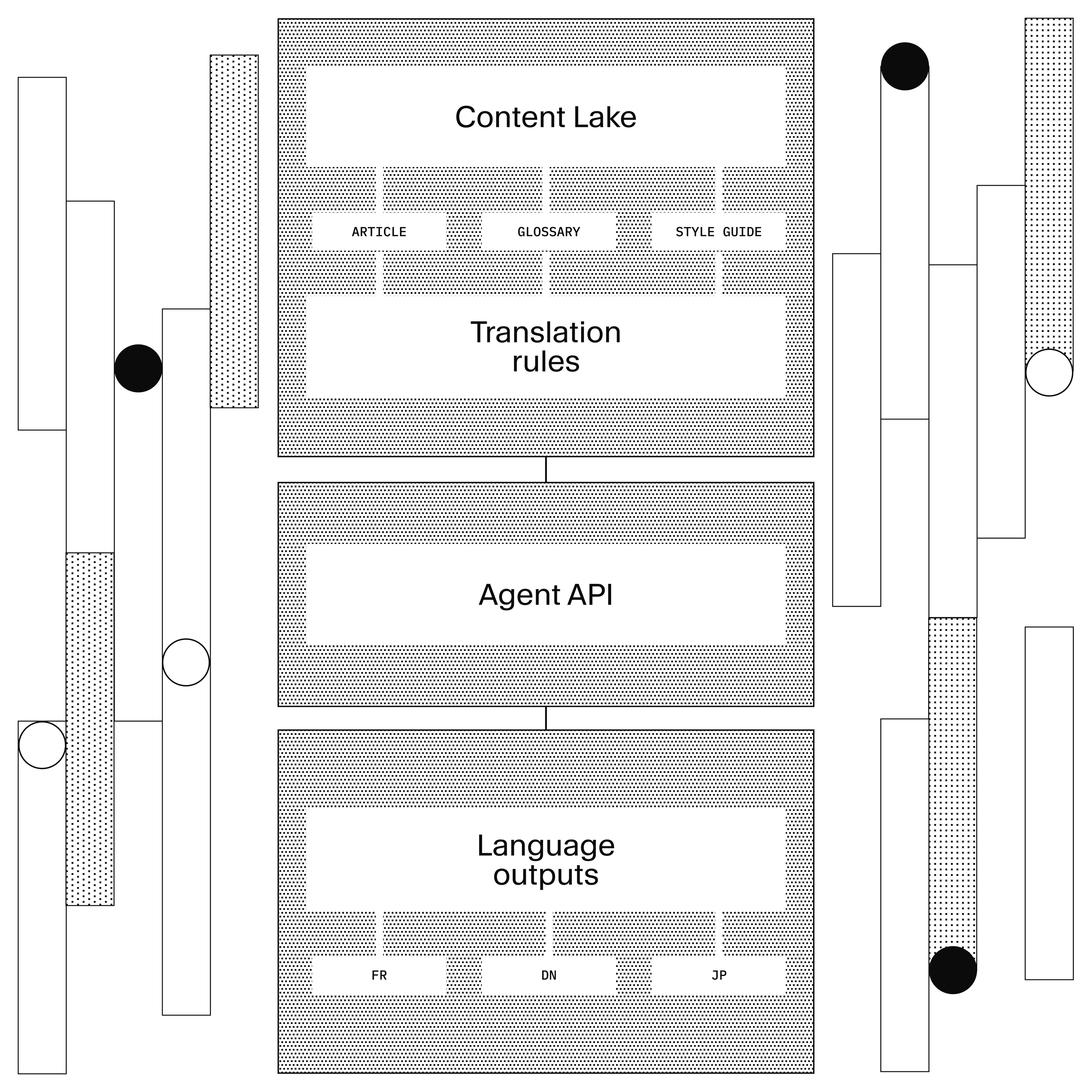
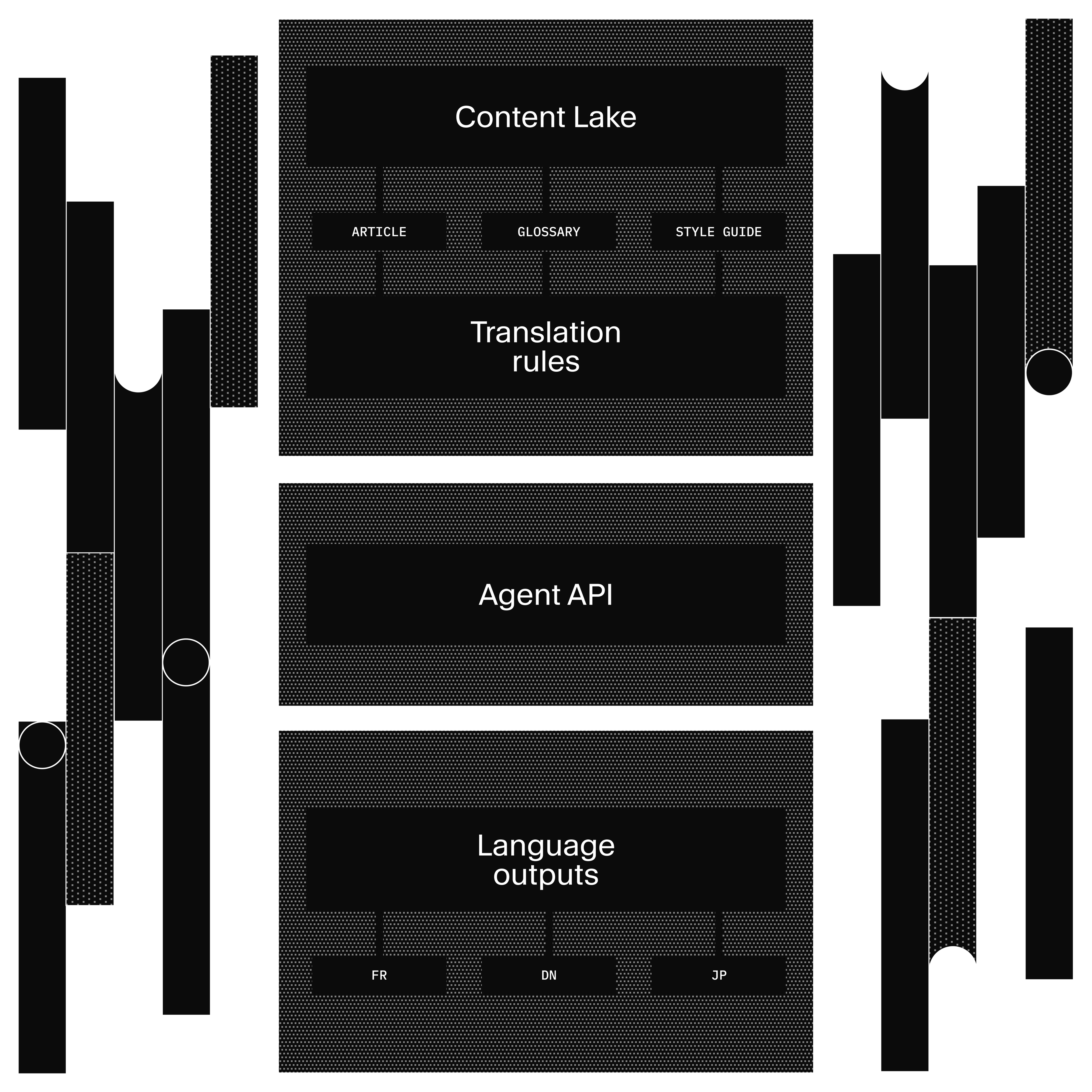
Glossaries + Style Guides (Sanity documents)
    ↓ filtered by source document content (RAG-style)
promptAssembly.ts
    ↓ assembles styleGuide string + protectedPhrases array
Agent API translate()
    ↓ schema-aware, field-level translation with metadata
Draft translations (Content Lake)
    ↓ editor review in Studio
Content Release (bundle)
    ↓ publish all locales
Published content
Why metadata matters: Enterprise translation management systems have known for decades that translation quality depends on context: approved terminology, style rules, do-not-translate lists, locale-specific conventions. AI translation tools are powerful but generic. They don't have access to your metadata. Sanity bridges both: structured content gives AI the context it needs, and the Agent API automates the workflow that traditional TMS makes manual.
Why structure matters: When you paste content into a generic AI tool, it sees a wall of text. It doesn't know author is a reference, price is a number, or slug is a URL. The Agent API sees your schema. It translates title and body, skips author and price, and localizes slug. Field descriptions act as additional translation instructions.
Why filtering matters: A glossary with 500 entries is noise if only 12 terms appear in the document you're translating. filterGlossaryByContent() extracts text from the source document, matches it against glossary terms, and only injects the relevant ones. DNT and forbidden entries are always included as guardrails regardless of whether they appear in the source. This is the same principle behind RAG retrieval: don't dump everything into the prompt. Give the model what it needs for this specific job.
Two paths to the same result: The walkthrough above shows the programmatic path (client.agent.action.*). Editors can also use Content Agent directly in Studio for interactive, one-off translations. Same schema awareness, same quality. The API is for automation and batch operations. Studio is for editorial workflows.
What works and what doesn't
Works well: Marketing copy, product descriptions, blog posts, UI strings. Content where tone matters and you have established terminology. High-volume content that would take weeks with an agency. The structured metadata approach shines here because these content types have consistent terminology and style requirements.
Works with caveats: Legal content, technical documentation, medical/financial content. AI drafts save time but human review is mandatory. The glossary helps with terminology consistency, but domain expertise for review is not optional.
Doesn't replace: Literary translation, highly creative content, content requiring deep cultural adaptation (not just linguistic translation), regulatory content where certified human translation is required.
The eval caveat: The eval framework uses an LLM judge (Claude Haiku), which means scores have variance across runs. The starter averages 3 trials to smooth this out, but don't treat the scores as absolute measurements. They're directional: "structured metadata helps" is the finding, not "structured metadata improves quality by exactly 23%."
The experimental API caveat: The Agent API uses apiVersion: 'vX' and is marked experimental. APIs may change. For production workflows, pin your client version and test after updates.
The glossary investment: This approach requires upfront work to build your glossary and style guides. Content Agent can accelerate this (see below), but plan for localization team involvement to validate and maintain terminology over time. The payoff is that updates happen in Studio without developer involvement.
Building a glossary from scratch sounds like a lot of work. Content Agent can give you a head start. Ask it something like "Generate a translation glossary for my content, look at my blog posts and docs to identify brand terms, product names, and recurring phrases." It will scan your documents and produce a draft glossary with suggested translations and do-not-translate flags. Use the output as a starting point, then have your localization team refine it. Getting to 80% coverage takes minutes instead of days.
For teams managing content across many locales, the starter includes a translations dashboard built with the Sanity App SDK. It shows translation coverage per locale (how many of your 140 articles have a Spanish version?), surfaces stale translations where the source changed after the last translation, and lets you translate missing documents in bulk. You can send those translations directly into a Content Release for a coordinated market launch: translate 40 documents, preview the site with those translations, and publish them all at once when the launch date hits. Instead of checking documents one by one, you get a single view of where things stand across every market.
Try it yourself
The fastest path:
pnpm create sanity@latest --template sanity-labs/starters/agentic-localization --package-manager pnpm
pnpm bootstrap
This gives you a working Studio with the localization plugin, glossary and style guide document types, seed data for three locales (French, German, Japanese), and the eval framework.
To see the quality difference:
pnpm test                    # Unit tests (schema, prompt assembly, locale utils)
pnpm --filter l10n eval      # Model evals — requires sanity login, consumes AI credits
The eval output shows translations with and without structured metadata, scored by both deterministic checks and an LLM judge. The delta is the argument.
For the full Agent API reference, see the Agent API docs.
Next in this series: Agent Context for E-commerce shows how to give AI agents structured access to your product catalog for recommendations and chat.