Markdown input
Markdown input component and schema type. Supports image uploads.
Install command
npm i sanity-plugin-markdownsanity-plugin-markdown
What is it?
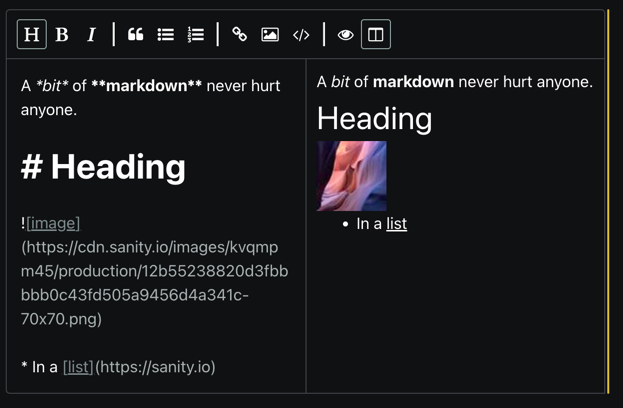
A Markdown editor with preview for Sanity Studio.
Supports Github flavored markdown and image uploads. You can either drag image(s) into the editor or click the bottom bar to bring up a file selector. The resulting image URL(s) are inserted with a default width parameter which you can change to your liking using the Sanity image pipeline parameters.
The current version is a wrapper around React SimpleMDE (EasyMDE) Markdown Editor, and by extension, EasyMDE.
Installation
Install sanity-plugin-markdown and easymde@2 (peer dependency).
npm install --save sanity-plugin-markdown easymde@2Usage
Add it as a plugin in sanity.config.ts (or .js):
import {markdownSchema} from 'sanity-plugin-markdown'

export default defineConfig({
  // ...
  plugins: [markdownSchema()],
})
Then, declare a field in your schema to be markdown
const myDocument = {
  type: 'document',
  name: 'myDocument',
  fields: [
    {
      type: 'markdown',
      description: 'A Github flavored markdown field with image uploading',
      name: 'bio',
    },
  ],
}
Next.js compatability
Next.js without Next 13 app directory does not support css imports from node_modules.
To use this plugin in this context (pages directory), use the sanity-plugin-markdown/next import instead of sanity-plugin-markdown:
import {markdownSchema} from 'sanity-plugin-markdown/next'Then, make sure to add
import 'easymde/dist/easymde.min.css'to the top of pages/_app.tsx.
Customizing the default markdown input editor
The plugin takes an input config option that can be used in combination with the MarkdownInput export
to configure the underlying React SimpleMDE component:
- Create a custom component that wraps MarkdownInput
- Memoize reactMdeProps and pass along
// CustomMarkdownInput.tsx
import {MarkdownInput, MarkdownInputProps} from 'sanity-plugin-markdown'

export function CustomMarkdownInput(props) {
  const reactMdeProps: MarkdownInputProps['reactMdeProps'] = useMemo(() => {
    return {
      options: {
        toolbar: ['bold', 'italic'],
        // more options available, see:
        // https://github.com/Ionaru/easy-markdown-editor#options-list
      },
      // more props available, see:
      // https://github.com/RIP21/react-simplemde-editor#react-simplemde-easymde-markdown-editor
    }
  }, [])

  return <MarkdownInput {...props} reactMdeProps={reactMdeProps} />
}
Set the plugin input option:
// studio.config.ts
import {markdownSchema} from 'sanity-plugin-markdown'

import {CustomMarkdownInput} from './CustomMarkdownInput'

export default defineConfig({
  // ... rest of the config
  plugins: [markdownSchema({input: CustomMarkdownInput})],
})
Customize editor for a single field
Implement a custom input similar to the one above, and use it as components.input on the field directly.
defineField({
  type: 'markdown',
  name: 'markdown',
  title: 'Markdown',
  components: {input: CustomMarkdownInput},
})
Customizing editor preview
One way to customize the preview that does not involve ReactDOMServer (used by React SimpleMDE) is to install marked and DOMPurify and create a custom preview:
npm i marked dompurify
Then use these to create a custom editor:
import DOMPurify from 'dompurify'
import {marked} from 'marked'
// MarkdownInputCustomPreview.tsx
import {MarkdownInput, MarkdownInputProps} from 'sanity-plugin-markdown'

export function CustomMarkdownInput(props) {
  const reactMdeProps: MarkdownInputProps['reactMdeProps'] = useMemo(() => {
    return {
      options: {
        previewRender: (markdownText) => {
          // configure as needed according to
          // https://github.com/markedjs/marked#docs
          return DOMPurify.sanitize(marked.parse(markdownText))
        },
        //customizing using renderingConfig is also an option
      },
    }
  }, [])

  return <MarkdownInput {...props} reactMdeProps={reactMdeProps} />
}
Use the component as described in previous sections.
Custom image urls
Provide a function to options.imageUrl that takes a SanityImageAssetDocument and returns a string.
The function will be invoked whenever an image is pasted or dragged into the markdown editor, after upload completes.
The default implementation uses
;(imageAsset) => `${imageAsset.url}?w=450`Example imageUrl option
defineField({
  type: 'markdown',
  name: 'markdown',
  title: 'Markdown',
  options: {
    imageUrl: (imageAsset) => `${imageAsset.url}?w=400&h=400`,
  },
})
License
MIT-licensed. See LICENSE.


