Auto i18n
Per-language tabs on any string, text or rich-text field, with one-click machine translation via MyMemory or Azure Translator.
By tobi
Install command
npm i sanity-plugin-i18nsanity-plugin-i18n
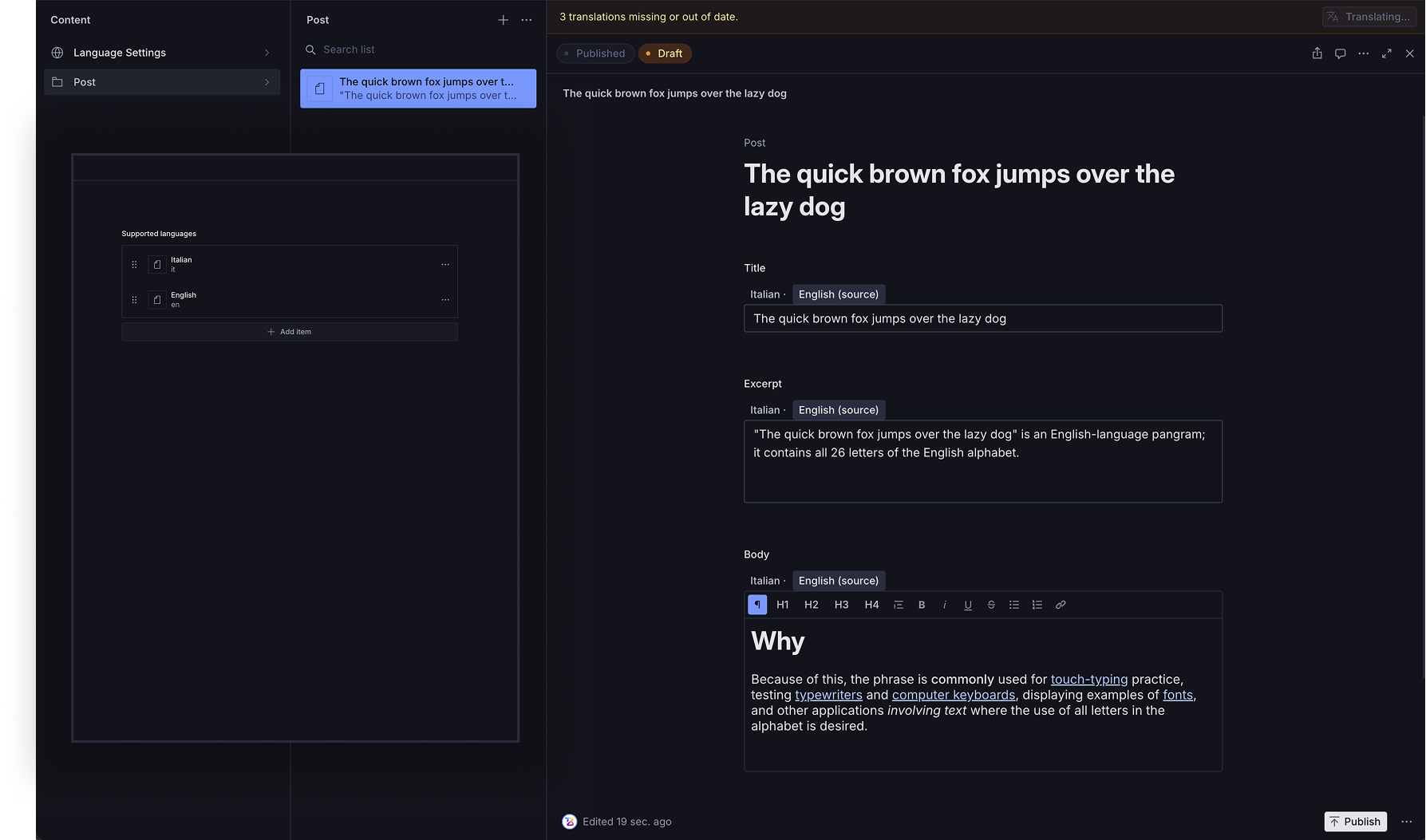
Field-level internationalization for Sanity Studio, with automatic machine
translation. Add autoI18n.string / autoI18n.text / autoI18n.blockContent
/ autoI18n.stringList fields to your schemas and get a per-language tab
editor for free — plus a one-click "Translate missing" action that fills
in every other configured language from your source text.
Requirements
sanitypackage^6.10.0or later — this is the first release that ships@sanity/uiv4, which the plugin's UI is built against. On Sanity^5(and on^6.0–^6.9) the plugin would pull in a second, conflicting copy of@sanity/ui.- React
^19.2— required transitively by@sanity/uiv4 and by Sanity itself, which peer-depends on React^19.2.2from v5 onwards. React 18 is not supported. - Node.js
>=20.19 <22or>=22.12
Installation
npm install sanity-plugin-i18nUsage
Add it as a plugin in sanity.config.ts (or .js):
import {defineConfig} from 'sanity'
import {autoI18nPlugin} from 'sanity-plugin-i18n'

export default defineConfig({
  //...
  plugins: [
    autoI18nPlugin({
      apiKey: process.env.SANITY_STUDIO_MYMEMORY_KEY, // optional
      email: 'you@email.com', // optional, raises the MyMemory rate limit
      defaultSourceLanguage: 'en', // fallback if no language is marked as source
    }),
  ],
})
This registers four schema types you can use instead of string / text /
a Portable Text block array / a plain string array:
defineField({name: 'title', type: 'autoI18n.string'})
defineField({name: 'excerpt', type: 'autoI18n.text'})
defineField({name: 'body', type: 'autoI18n.blockContent'}) // rich text
defineField({name: 'tags', type: 'autoI18n.stringList'}) // array of independently-translated strings| Type | Replaces | Notes |
|---|---|---|
autoI18n.string | string | single-line text |
autoI18n.text | text | multi-line plain text |
autoI18n.blockContent | an array of block | rich text — see "Rich text support" below |
autoI18n.stringList | an array of string | each list item has its own independent per-language value (e.g. tags) |
Each of the first three stores an array [{_key: 'en', value: '...'}, {_key: 'fr', value: '...'}]
instead of a single value — one tab per language in the Studio editor, handled automatically
by the plugin. autoI18n.stringList nests that same shape inside every list item, so tags
(or any short repeated string) can each carry their own translations independently.
Rich text support
autoI18n.blockContent supports paragraphs, headings (H1-H4), quotes, bulleted/numbered
lists, links, and the bold/italic/underline/strike-through decorators — not custom objects
or non-text blocks (images, etc. already present in the document are left untouched by
translation, see "Known limitations" below).
How translation works
The plugin adds two ways to trigger automatic translation (they do the same thing, deliberately redundant because the first one is easy to miss):
- A "Translate missing" action in the document toolbar, right next to "Publish".
- A banner at the top of the document form, shown whenever fields are missing or outdated, with a "Translate now" button.
Both translate from the source language to every other configured language, skipping fields that already have an up-to-date translation — if you edit the source text after already translating, the plugin notices on its own and only re-translates that field on the next click (it leaves untouched languages, and translations you edited by hand whose source hasn't changed since, alone).
Internationalized fields are found wherever they sit in the document: at the top
level, inside object fields (seo.title), and inside arrays of objects at any depth
(sections[].items[].heading). The one thing that is skipped is an array item without a
_key, because there is no stable way to address it in a patch.
Translation runs one API call per field per language, and both controls report progress and apply each translation as soon as it arrives. If a run stops partway — a rate limit, an exhausted quota, a dropped connection — everything already translated is kept, and you get a message saying how far it got. Clicking again resumes from there.
With provider: 'azure' (see below) these two controls disappear: translation no longer
runs in the browser, but automatically on save, via a Sanity Function.
Configuring languages (source and automatic translations)
The plugin adds a "Language Settings" entry to the Studio nav bar. It's a singleton —
there is always exactly one such document, with a fixed ID, and it can't be created a
second time or duplicated (the "+" new-document menu and the "Duplicate"/"Delete" actions
are disabled for it). From there you open a document with a supportedLanguages array,
where each row has:
code: the language code (e.g.en,fr,de) — must match the keys used in internationalized fields;label: the label shown on the editor tabs;isDefault: check this on exactly one language — it's the source language, the one translation starts from.
Every other language in the array automatically becomes a "target" language: when you click "Translate missing" on a document, the plugin translates from the source language to each of the other listed languages, skipping ones that already have a value.
If no language has isDefault: true, the defaultSourceLanguage passed in the config
is used instead (or en as a last-resort fallback). No translation is possible until
at least one language is configured — with none configured, internationalized fields
render an empty state instead of the tab editor.
Optional: a dedicated sidebar entry
By default, "Language Settings" is reachable from the nav bar tool above, and — because
it's a regular document type — it also shows up in the Structure tool's default "Content"
list, in a generic per-type list pane (this is a Sanity Studio limitation: a plugin has no
way to hide one of its own document types from the default Content list; only a custom
structure() in the Studio itself can do that).
If you'd rather have a single, dedicated sidebar entry that jumps straight to the document
(no "No documents of this type" state, no generic list) — the same experience you'd hand-build
for any other singleton — the plugin exports two helpers for your own structure():
// structure.ts
import type {StructureBuilder} from 'sanity/structure'
import {languageSettingsListItem, excludeLanguageSettingsType} from 'sanity-plugin-i18n'

export const structure = (S: StructureBuilder) =>
  S.list()
    .title('Content')
    .items([languageSettingsListItem(S), ...excludeLanguageSettingsType(S.documentTypeListItems())])
// sanity.config.ts
import {structureTool} from 'sanity/structure'
import {structure} from './structure'
export default defineConfig({
// ...
plugins: [structureTool({structure}), autoI18nPlugin({...})],
})languageSettingsListItem(S) builds the sidebar entry; excludeLanguageSettingsType(...)
removes the type from the generic per-type list so it doesn't appear twice.
Translation engine: MyMemory (default) or Azure Translator
autoI18nPlugin({
  provider: 'mymemory', // default — no need to set it explicitly
  apiKey: process.env.SANITY_STUDIO_MYMEMORY_KEY, // optional
  email: 'you@email.com', // optional, raises the MyMemory rate limit
})
MyMemory (default) — called directly from the browser, works out of the box with no extra configuration. No infrastructure to set up or maintain. Recommended to get started, for small projects, or if you don't want to manage an Azure account.
Where your content goes. With MyMemory, the text of the fields being translated leaves the editor's browser and is sent to
api.mymemory.translated.net, a third-party service. MyMemory is a translation memory: by design it retains and reuses the segments it receives, which is exactly why it can answer without a paid key. Don't use it for confidential or personal data. Azure Translator, by contrast, states that it does not retain submitted text — and withprovider: 'azure'the request leaves your Sanity Function, not the editor's browser.
Azure Translator (provider: 'azure') — noticeably better translation quality (a real
machine translation engine, not a translation memory — see "Known limitations"), but
requires extra infrastructure: the Azure subscription key can't live in the Studio's
browser bundle, so translation runs in a server-side Sanity Function that fires on its own
whenever a document is saved. See the full step-by-step guide in
azure-function-template/README.md — it requires an
Azure account (a free tier is available), a few terminal commands (sanity blueprints),
and copying a couple of files into your Studio repo. Not complicated, but not "zero
config" like MyMemory: if you're just trying out the plugin, start with MyMemory.
Advanced: building a custom translation provider
If neither MyMemory nor Azure fits (e.g. you want DeepL, or an in-house translation service), the plugin exports the pieces used internally to build one:
import {
  fetchLanguageSettings, // reads the Language Settings singleton -> {sourceLang, targetLangs}
  findInternationalizedFieldPaths, // walks a document, returns every autoI18n.* field's path
  findPendingTranslations, // diffs source vs. translated values, returns what needs (re)translating
  buildTranslationPatches, // runs a TranslationProvider over pending translations, returns Sanity patches
  hashSourceValue, // hashing used to detect a stale translation (source edited since last run)
  hasContent, // true if a LocaleValue actually holds text/blocks
  createMyMemoryProvider,
  createAzureProvider,
} from 'sanity-plugin-i18n'
import type {
  TranslationProvider, // the interface a custom provider must implement
  PendingTranslation,
  LocaleValue,
  LanguageEntry,
  AzureProviderOptions,
} from 'sanity-plugin-i18n'
TranslationProvider is the shape both bundled providers implement: a required
translateText(text, from, to), plus an optional translateTexts(texts, from, to) for
APIs that accept a batch. When a provider implements the batch method, every span of a
rich-text field is translated in one round trip instead of one call each; when it
doesn't, the plugin falls back to sequential calls automatically.
Importing the core outside the Studio
These functions are also available from a second, framework-free entry point:
import {buildTranslationPatches, createAzureProvider} from 'sanity-plugin-i18n/core'sanity-plugin-i18n/core pulls in no React, no @sanity/ui and nothing from the Studio
runtime, so it can be imported from a Sanity Function, a migration script or a plain Node
process. The Azure Function in
azure-function-template/
is built on it, and is a good reference for writing your own server-side translation
Function.
Known limitations
Document previews (list rows, the document title bar) break by default: since
autoI18n.string/autoI18n.text/autoI18n.blockContentstore an array of{_key, value, sourceHash}instead of a plain string, Sanity Studio's automatic preview (which expects a field literally namedtitleto be a string) can't derive a title from it and falls back to showing the raw serialized array. Fix it by adding an explicitpreviewto any document type that uses one of these fields as its title/subtitle:const localeValueToText = (value: unknown, sourceLang = 'en') => { const values = Array.isArray(value) ? value : [] return values.find((v: any) => v._key === sourceLang)?.value || values[0]?.value } defineType({ name: 'post', type: 'document', fields: [ defineField({name: 'title', type: 'autoI18n.string'}), // ... ], preview: { select: {title: 'title'}, prepare({title}) { return {title: localeValueToText(title) || 'Untitled'} }, }, })Use the same
sourceLangyou configured asisDefaultin Language Settings (or yourdefaultSourceLanguage).localeValueis a generic_typename: the plugin recognises an internationalized field by looking for array items with_type: 'localeValue', and that name is not namespaced (everything else in the plugin is, underautoI18n.).In practice the exposure is narrow. A field is only ever translated if it also has an item keyed with your configured source language, carrying content — so a foreign
localeValuearray keyed by anything else (k1, a UUID, a slug) is skipped entirely, with no patch and no entry in the pending count. The one case that would collide is another type namedlocaleValuewhose items are keyed by exactly your configured language codes; at that point it is indistinguishable from one of ours. Both behaviours are pinned by tests.If you do have such a type, rename it on your side — renaming it in the plugin would break every document already stored.
The banner is built on a Sanity internal API: the top-of-form banner is mounted via
document.components.unstable_layout, which Sanity marks@internal— it can change or disappear in a patch release without a deprecation cycle. The component is written defensively (a failure there still renders the document form), and the "Translate missing" toolbar action does the same job without relying on it, but this is worth knowing before pinning a Studio version.MyMemory is a translation memory, not a real translation engine: it returns the closest match in its database (often extracted from books, academic papers). On short or generic text, it can occasionally return fragments unrelated to your source (e.g. a bibliographic citation). The plugin filters out the most suspicious results (low quality score, anomalous length), but it's not an absolute guarantee — this doesn't happen with Azure Translator.
Span-by-span translation in rich text: to preserve bold/italic with APIs that only translate plain text, every "span" in a Portable Text block is translated as its own segment. This can reduce fluency when a sentence is split by inline formatting (e.g. "the black cat" translated as two separate segments instead of as one full sentence). The Azure Function batches these into a single request per field, so the cost is in translation quality, not in the number of API calls.
autoI18n.blockContentdoesn't support custom objects: only text blocks (paragraphs, headings, quotes, lists) with decorators/links — no inline images, code blocks, or other custom block objects inside the translated field. If your regular block content needs those, keep them out ofautoI18n.blockContentor handle them in a separate field.Links in the editor are created via a browser prompt (
window.prompt), not a real dialog — simple but unpolished: no URL validation, and editing an existing link means removing and re-creating it rather than editing it in place.
License
MIT © tobi
Develop & test
This plugin uses @sanity/plugin-kit with default configuration for build & watch scripts.
See Testing a plugin in Sanity Studio on how to run this plugin with hotreload in the studio.
Release new version
Run the "CI & Release" workflow. Make sure to select the main branch and check "Release new version".
Semantic release will only release on configured branches, so it is safe to run release on any branch.