Reference
A schema type for referencing other documents.
Relations between documents are modeled using the reference type. To model a one-to-many relation, store the references in an array.
References can be either strong (default) or weak. A strong reference will enforce that the document it points to actually exists, and will not allow deletion of a document that any other document refers to. A weak reference allows pointing to documents that may not exist (yet) or may have been deleted.
Gotcha
Whether a reference should be strong or weak is configured by setting the weak property on the reference field. Note that merely changing this property won't automatically update reference fields in the data store.
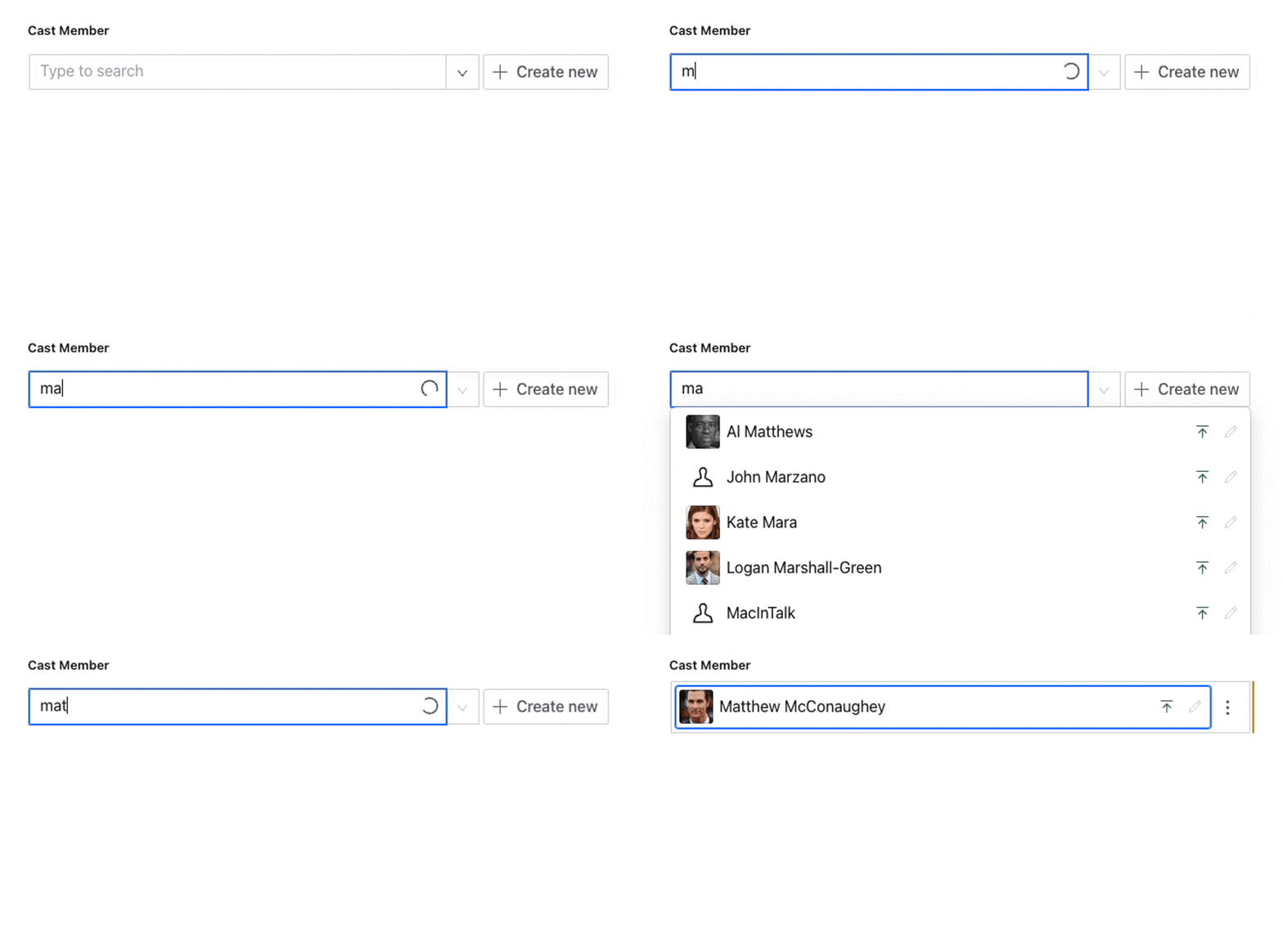
When working in Sanity Studio, the reference input allows you to search for already existing documents, or create and publish new documents of the appropriate type inline from the place of referral. In order to secure referential integrity, the referring document will be blocked from publishing until the new, referenced, document has been published. The exception is if the reference has the property weak: true.
Protip
For a more in-depth discussion on how to think about references in Sanity, we recommend reading the supplementary article Connected Content.
Properties
Requiredtype
string
Value must be set to
reference.Requiredname
string
The field name. This will be the key in the data record.
Requiredto
array
An array of objects containing a
typeproperty that points to the document type that can be referenced. For example:[{type: 'person'}]title
string
A human-readable label for the field.
description
string
A short description visible to editors that describes how to use the field.
weak
boolean
If set to
true, the reference will be made weak. This allows references to point to documents that may or may not exist, such as a document that has not yet been published or one that has been deleted. Defaults tofalse.boolean | fn
If set to
true, this field will be hidden in the studio. You can return a callback function to use this as a conditional field. Defaults tofalse.readOnly
boolean | fn
If set to
true, this field will be readOnly in the studio. You can return a callback function to use this as a conditional field. Defaults tofalse.The initial value that will be used when creating new values from this type. Can be a literal value or a resolver function that returns the initial value or a promise that resolves to the initial value.
deprecated
object
Marks a field as deprecated. Requires a single
reasonproperty that displays a user-facing message to explain the deprecation. When used with GraphQL, this is translated to a @deprecated directive. Example:{reason: 'no longer used'}
Options
disableNew
boolean
Disables inline creation of new documents from the references field. Defaults to
false.creationTypeFilter
function
A callback function that dynamically filters which document types can be created inline from the reference field. The function receives an object containing the current
documentand an array of the types defined in thetoproperty, and should return a filtered array of types.The callback is invoked with
({document, parent, parentPath}, toTypes)wheredocumentis the current document being edited, andtoTypesis an array of type objects from thetoproperty. Return a filtered array to restrict creation options, or return an empty array to hide the create button entirely (equivalent todisableNew: true).Note: This only affects which types appear in the create menu. It does not restrict which existing documents can be referenced. Use the
filteroption to constrain referenceable documents.filter
string | function
Additional GROQ-filter to use when searching target documents. The filter will apply to the already existing type defined in
to.If a function is provided, it is called with an object containing
document,parent, andparentPathproperties as well as agetClient()method. It should return an object containingfilterandparams. This can optionally be async and return a promise that resolves this object.Note: The filter only constrains the list of documents returned at the time you search. It does not guarantee that the referenced document will always match the filter provided.
filterParams
object
Object parameters for the GROQ-filter specified in filter.
sort
array
An array of objects to aid in sorting the available reference results, each with a
directionandfieldproperty. For example:[{ direction: "asc", field: "title" }].
Validation
Ensures that this field exists
Creates a custom validation rule.
Reference recipes
Common patterns for reference fields, including ones that the schema cannot change directly.
Default reference
Define the movie's director as a reference to a person:
Input
{
  name: 'movie',
  type: 'object',
  fields: [
    {
      title: 'Director',
      name: 'director',
      type: 'reference',
      to: [{type: 'person'}]
    }
  ]
}
Response
{
  "_type": "reference",
  "_ref": "ffda9bed-b959-4100-abeb-9f1e241e9445" /* This could be the id of Jessica Chastain */
}
Weak reference
Define the screening's movie as a weak reference to a movie, thereby allowing the movie to be deleted without deleting the screening first:
Input
{
  name: 'screening',
  type: 'document',
  fields: [
    {
      name: 'movie',
      title: 'Movie',
      type: 'reference',
      weak: true,
      to: [{type: 'movie'}],
      description: 'Which movie are we screening'
    },
  ]
}
Response
{
  "_type": "reference",
  "_ref": "93f3af18-337a-4df7-a8de-fbaa6609fd0a" /* Movie id */
  "_weak": true
}
Reference multiple types
The directors field is an array which can contain both person and bovinae (in the rare occasion a cow would direct a movie) references:
Input
{
  title: 'Directors',
  name: 'directors',
  type: 'array',
  of: [
    {
      type: 'reference',
      to: [
        {type: 'person'},
        {type: 'bovinae'}
      ]
    }
  ]
}
Response
[
  {
    "_type": "reference",
    /* this could be the id of Yvonne, the escaped cow */
    "_ref": "9b711031-3744-47ab-9bb7-1bceb177d0d0"
  },
  {
    "_type": "reference",
    /* this could be the id of Matt Damon */
    "_ref": "ffda9bed-b959-4100-abeb-9f1e241e9445"
  }
]
Additional static filter
If providing a target schema type is not enough to provide a meaningful set of search results, you may want to further constrain the search query:
Input
{
  title: 'Director',
  name: 'director',
  type: 'reference',
  to: [{type: 'person'}],
  options: {
    filter: 'role == $role',
    filterParams: {role: 'director'}
  }
}
Response
{
  "_type": "reference",
   /* this could be the id of some director */
  "_ref": "9b711031-3744-47ab-9bb7-1bceb177d0d0"
},
Additional dynamic filter
If you want to further constrain the search result, but need properties from the surrounding document or object/array, you can use the function form for filter:
Input
{
  title: 'Director',
  name: 'director',
  type: 'reference',
  to: [{type: 'person'}],
  options: {
    filter: ({document}) => {
      // Always make sure to check for document properties
      // before attempting to use them
      if (!document.releaseYear) {
        return {
          filter: 'role == $role',
          params: {role: 'director'}
        }
      }

      return {
        filter: 'role == $role && birthYear >= $minYear',
        params: {
          role: 'director',
          minYear: document.releaseYear
        }
      }
    }
  }
}
Response
{
  "_type": "reference",
   /* this could be the id of some director,
    * born after the movie was released */
  "_ref": "9b711031-3744-47ab-9bb7-1bceb177d0d0"
}
Additional async filter
If you want to constrain your filter based on factors available elsewhere in your content lake, you can specify your filter as an asynchronous function.
Input
{
  // Somewhat contrived example that will make the reference field accept any document of a valid type except the most recently published
  name: 'personRef',
  type: 'reference',
  to: [{type: 'director'}, {type: 'actor'}, {type: 'producer'}],
  options: {
    filter: async ({getClient}) => {
      const client = getClient({apiVersion: '2023-01-01'})
      const latestPersonId = await client.fetch(
        '*[title in ["director", "actor", "producer"] && _id in path("*")] | order(_createdAt desc) [0]._id'
      )
      return {
        filter: '_id != $latestPersonId',
        params: {latestPersonId: latestPersonId},
      }
    },
  },
}
Response
{
  "_type": "reference",
   /* this could be the id of some director, actor, or producer */
  "_ref": "9b711031-3744-47ab-9bb7-1bceb177d0d0"
}
Disable new document creation
If you wish to disable the inline creation of new document from the reference field. This is done by setting the disableNew option to true.
{
  title: 'Director',
  name: 'director',
  type: 'reference',
  to: [{type: 'person'}],
  options: {
    disableNew: true,
  }
}
Filter creation types dynamically
When a reference field can point to multiple document types, you may want to control which types can be created inline based on the current document's data. The creationTypeFilter option accepts a callback function that receives the current document and returns a filtered list of types.
defineField({
  name: 'participant',
  title: 'Individual or team participant',
  type: 'reference',
  to: [{type: 'individual'}, {type: 'team'}],
  options: {
    creationTypeFilter: ({document}, toTypes) => {
      if (document.participantType === 'individual') {
        return toTypes.filter((t) => t.type === 'individual')
      }
      if (document.participantType === 'team') {
        return toTypes.filter((t) => t.type === 'team')
      }
      return toTypes
    },
  },
})
If creationTypeFilter returns an empty array, the create button will be hidden from the reference field. This produces the same behavior as setting disableNew: true.
Nonexistent reference
Sometimes the reference field may show an error message like <nonexistent reference>. This usually happens when creating documents with a client library and can mean one of two things:
- The document with the ID you are referencing does not exist
- The field does not allow references to the document type of the document ID you tried to reference
Create reference programmatically
If you want to create a reference to another document when using our APIs, you need to know the ID of the document you want to create a reference to. Then you need to add that to an object with the following form:
{
  _type: 'reference',
  _ref: 'id-of-reference-document'
}
Here's an example using the Javascript client:
import {createClient} from '@sanity/client'

export const client = createClient({
  projectId: 'YOUR_PROJECT_ID',
  dataset: 'YOUR_DATASET',
  useCdn: true,
  apiVersion: '2023-05-03',
  token: process.env.SANITY_SECRET_TOKEN // Must have write access
})

client.create({
  _type: 'book',
  title: 'Some book title',
  author: {
    _type: 'reference',
    _ref: 'id-of-author-document'
  }
})
.then(result => {
  console.log(`Created book with id: ${result._id}`)
})
Always reference the published document _id
Whenever referencing another document, you should always used the published—or what will become the published—identifier (_id).
Weak references to unpublished documents
A weak reference can point to a document that has not been published yet. The referring document publishes without waiting for the target, and the reference resolves once the target is published. This comes up most often in scheduled publishing workflows — see Scheduled drafts.
The payload differs while the referring document is still a draft. When you select an unpublished document in the reference input, Studio adds a _strengthenOnPublish object next to _weak: true. Publishing the referring document removes _strengthenOnPublish and keeps _weak: true, because the field is weak. The published payload is the same whether or not the target was published:
{
  "_type": "reference",
  "_ref": "cbf5d0e2-1a3b-4f7c-9e21-0d5a6c8b7e14",
  "_weak": true,
  "_strengthenOnPublish": {
    "type": "person",
    "weak": true
  }
}
{
"_type": "reference",
"_ref": "cbf5d0e2-1a3b-4f7c-9e21-0d5a6c8b7e14",
"_weak": true
}Studio's reference input is what adds _strengthenOnPublish. References you create with a client library contain exactly the fields you write.
Validation does not check whether the target is published. On a reference array, rule.required() checks that the array is present — Studio unsets the field when you remove the last item, so an empty array fails. A reference to a document that exists only as a draft passes, and the referring document can be published.
required() checks the array, not the target
Sanity's built-in reference validation checks that the target exists as a published document, but it skips that check for weak references. If your workflow needs the target published before the referring document goes out, add a custom rule that queries for the published document.
In GROQ, dereferencing a weak reference whose target is not visible returns null instead of an error. Visibility follows the perspective you query: on the published perspective the value stays null until the target is published, and on the drafts perspective the same reference resolves to the draft. See GROQ operators.
*[_type == "screening" && _id == $id][0]{
  title,
  "movieTitle": movie->title
}
{
"title": "Opening night",
"movieTitle": null
}Once the target is published, api.sanity.io returns the resolved value on the next request. apicdn.sanity.io serves cached results until the cache is invalidated, so a query made immediately after publishing can still return null. See API CDN.
TypeGen generates the same types for weak and strong references. Both produce a reference type with an optional _weak field, and neither includes _strengthenOnPublish. Nothing in the generated types tells a weak reference apart from a strong one, so check the schema rather than the types:
export type PersonReference = {
  _ref: string
  _type: 'reference'
  _weak?: boolean
  [internalGroqTypeReferenceTo]?: 'person'
}

export type Movie = {
  // ...
  strongDirector?: PersonReference
  weakDirector?: PersonReference
}
Reference unpublished version documents programmatically
If you're working with drafts or Content Releases, you shouldn't need to handle this. This technique is only for scenarios where you're creating versions of documents not associated with a release.
When you're programmatically creating version documents that need to reference each other, you may run into the problem where you're trying to reference a document that hasn't been published. Weak references should work as expected, but strong references require more work. You incorporate the following into any custom logic that creates and publishes version references.
- Create the reference with the
_strengthenOnPublishattribute and_weakset totrue. The contents of the_strengthenOnPublishobject are primarily used to inform previews in Studio. You can leverage this content further if needed. - On publish, find all
_strengthenOnPublishreferences and remove it along with the_weakproperty.
{
  "_id": "123456",
  "_type": "book",
  "author": {
    "_type": "reference",
    "_ref": "ref-id-of-author",
    "_weak": true,
    "_strengthenOnPublish": {
      "type": "author",
      "template": {
        "id": "author"
      }
    }
  }
}
{
"_id": "123456",
"_type": "book",
"author": {
"_type": "reference",
"_ref": "ref-id-of-author",
}
}Find documents that reference the current document
To restrict a reference field to documents that already reference the current document, use a function filter with references($id) and pass the current document's _id as a parameter:
defineField({
  name: 'mentions',
  type: 'reference',
  to: [{type: 'article'}],
  options: {
    filter: ({document}) => ({
      filter: 'references($id)',
      params: {id: document._id},
    }),
  },
})
This is useful for bidirectional relationships where you only want to link to a document if it already links back.
The to array is static
The to property accepts only a literal array of type entries, such as [{type: 'person'}, {type: 'company'}]. It does not accept a function, a wildcard, or a way to express "any document type." To reference multiple types, list each one explicitly. To change which of the listed types can be created inline based on the current document, use creationTypeFilter.
To dynamically restrict which documents are selectable (as opposed to creatable), use options.filter with a function that returns a GROQ filter and params.
Customize the type-select dropdown labels
When a reference can point to multiple types, the type-picker dropdown shows each type's own title value. The schema has no way to override these labels per reference field. If you need different labels in different contexts, define separate types with the labels you want, for example articleAuthor and bookAuthor, each with its own title.
The Array type's insertMenu configuration can group types, switch to a grid view with preview images, and toggle filtering or icons, but it cannot rename individual entries. See Array type for the full insert-menu surface.
Hide already-selected references in an array
When a reference field lives inside an array, options.filter receives the array of existing items as its parent argument. Collect the _ref values from those items and exclude them with !(_id in $selectedIds):
import {defineField, type Reference} from 'sanity'

defineField({
  name: 'projects',
  type: 'array',
  of: [
    {
      type: 'reference',
      to: [{type: 'project'}],
      options: {
        filter: ({parent}) => {
          const selectedIds = ((parent as Reference[] | undefined) || [])
            .map((item) => item?._ref)
            .filter((ref): ref is string => Boolean(ref))
          return {
            filter: '!(_id in $selectedIds)',
            params: {selectedIds},
          }
        },
      },
    },
  ],
})
The shape of parent depends on context. For a reference at the top level of a document, parent is the document object. For a reference inside an array, it is the array of items currently in that array, which is what makes this recipe work.
Disable the Replace action on a reference field
The Replace and Clear actions on a reference field are rendered by the built-in reference input. The schema has no option to disable them individually. The only schema-level toggle on the reference input is options.disableNew, which controls the inline Create new button. To remove Replace specifically, register a custom input component for the field and render only the actions you want. Setting readOnly: true hides the entire action menu but also disables editing, which is usually too broad.
What you can configure on the reference input
Schema-level controls on the reference input are limited to options.disableNew, options.filter, options.creationTypeFilter, and weak. The Replace action, the Clear action, and the type-select dropdown labels are not configurable through the schema. For anything beyond that surface, use a custom input component.
Writing GROQ queries for references
References by default are bi-directional and can be queried from either side of their relationship. For a movie that has an actors array referencing multiple person documents, we can join the person data to the movie by dereferencing its data, but we can also query all movies associated with a person.
Join the actor data onto movie data
*[_type == "movie"] {
  ...,
  "actors": actors[]{
    ...
    person->
  }
}
Get all movies for a person
*[_type=="person"]{
  name,
  "relatedMovies": *[_type=='movie' && references(^._id)]{
  	title,
  	slug,
  	releaseDate
	}
}