AI Image Generation
Generate images in your content workflow with Gemini
By Nick Jensen
Install command
npm i sanity-plugin-gemini-ai-imagesSanity Plugin: Gemini AI Image Generator
AI-powered image generation for Sanity Studio using Google's Gemini 2.5 Flash Image model.


Features
Single Image Generation
- Text-to-Image Generation: Create images from descriptive prompts
- Image-to-Image Editing: Upload photos and generate AI-powered variations
- Change backgrounds (studio, outdoor, luxury, lifestyle)
- Add lighting effects (dramatic, golden hour, reflections)
- Remove clutter and enhance details
- Create color variants and seasonal themes
- Prompt Templates: Pre-built templates for both generation and editing
- Prompt Builder: Guided interface for constructing effective prompts
NEW: Image Series Generation
- Batch Generation: Generate 2-10 images in a single request with visual consistency
- Congruent Variations: Maintain consistent style across all images while varying specific elements
- Variation Types:
- Different Angles (front, 45°, top-down, side profile)
- Different Contexts (lifestyle, minimal, in-use, environmental)
- Different Backgrounds (minimalist, outdoor, urban, textured)
- Different Lighting (natural, dramatic, golden hour, cool tones)
- Consistency Levels: Choose from strict, moderate, or loose consistency
- Variation Templates: 8 template libraries with 40+ variation patterns
- Gallery Preview: Review all generated images before uploading
- Selective Upload: Choose which images from the series to save
Core Features
- Seamless Integration: Appears directly in Sanity Studio's image picker alongside Upload, Unsplash, etc.
- Multiple Aspect Ratios: Support for 1:1, 16:9, 9:16, 4:3, 3:2, and more
- Direct Sanity Upload: Generated images automatically uploaded to Sanity assets
- Secure Backend: API key stays server-side only
- Framework Adapters: Ready-to-use adapters for Next.js and serverless platforms
Screenshots
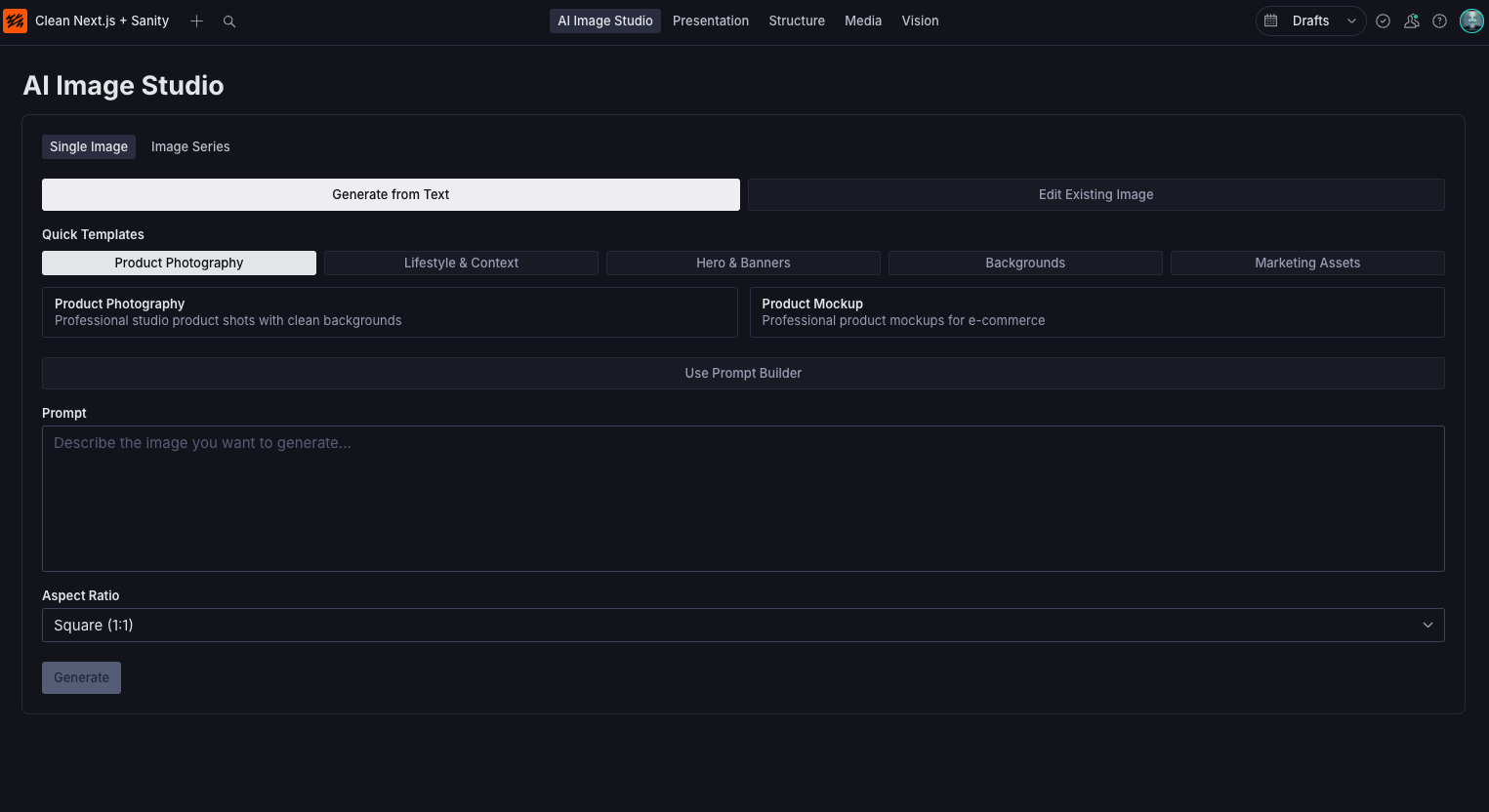 AI Generator Studio operates as a stand alone tool
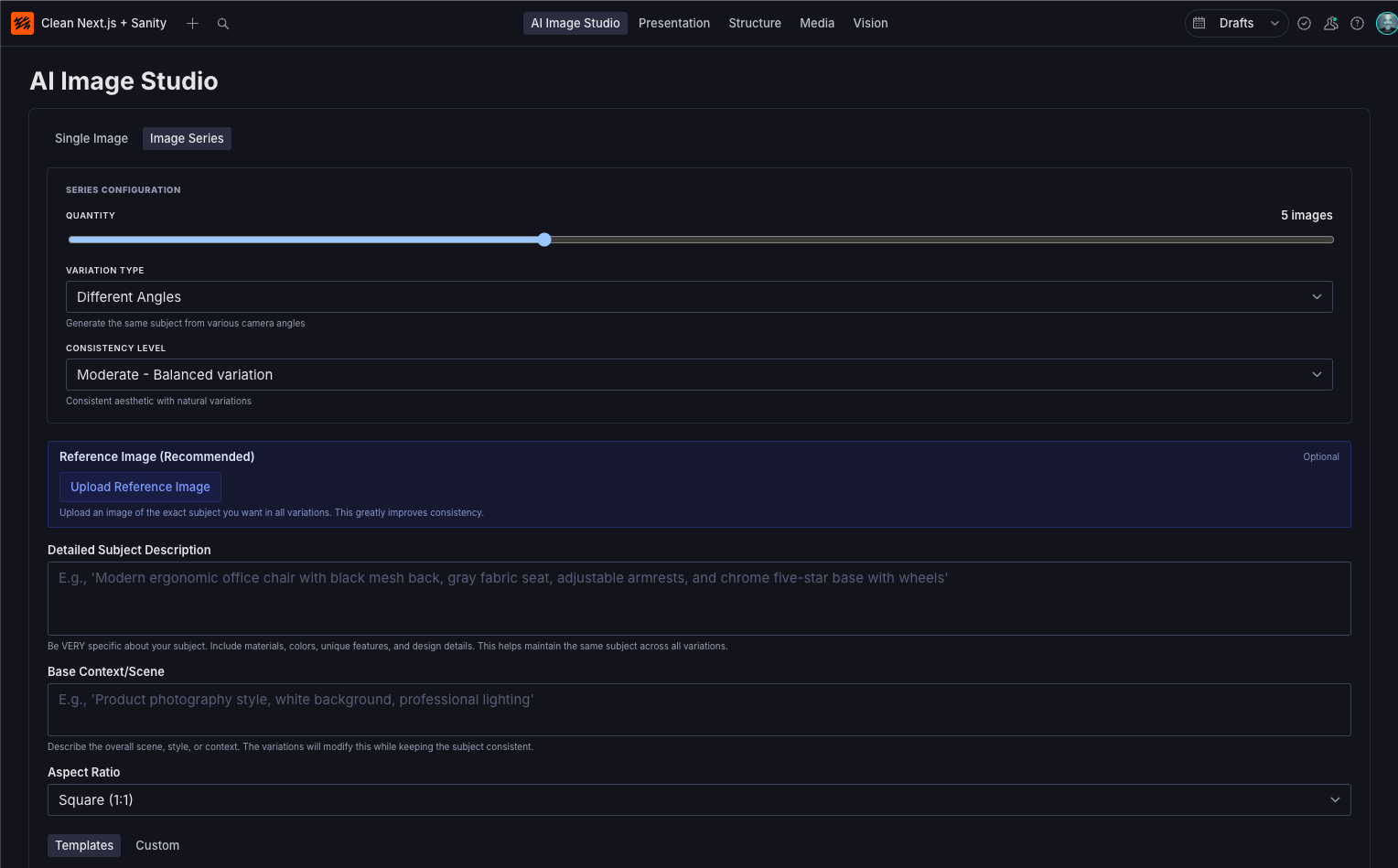 AI Generator Studio offers Image Series to generate multiple images in a series and operates as a stand alone tool
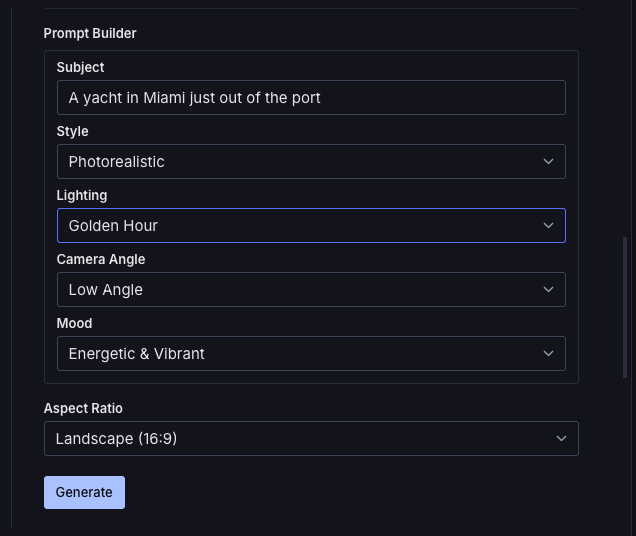
 AI Generator appears directly in the image picker alongside other sources
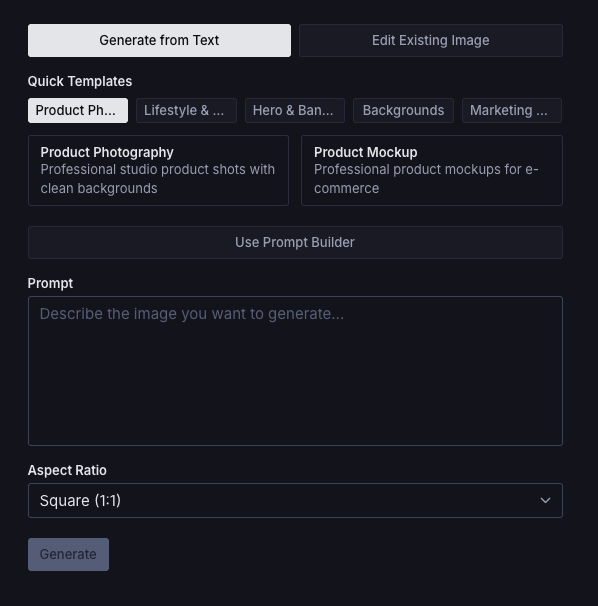
 Generate images from text prompts with templates and aspect ratio options
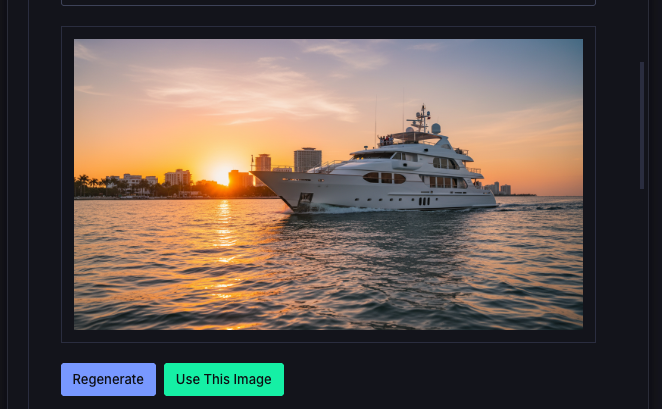 Upload and edit existing images with AI-powered modifications
Quick Start (Next.js)
1. Install Packages
npm install sanity-plugin-gemini-ai-images sanity-plugin-gemini-ai-images-nextjs @google/genai2. Add Plugin to Sanity Config
// sanity.config.ts
import { defineConfig } from "sanity";
import { geminiAIImages } from "sanity-plugin-gemini-ai-images";

export default defineConfig({
  // ... other config
  plugins: [
    geminiAIImages(),
    // ... other plugins
  ],
});
3. Create API Route
// app/api/gemini/generate-image/route.ts
import { POST } from "sanity-plugin-gemini-ai-images-nextjs/route";

export { POST };
CORS Configuration:
- If your Sanity Studio is integrated with your Next.js app (e.g.,
/studioroute), CORS is not needed - If your Sanity Studio is hosted elsewhere (e.g.,
studio.yoursite.comor Sanity Cloud), you must enable CORS for this route:
// app/api/gemini/generate-image/route.ts
import { POST as GeminiPOST } from "sanity-plugin-gemini-ai-images-nextjs/route";

export async function POST(request: Request) {
  const response = await GeminiPOST(request);

  // Add CORS headers for external Studio
  response.headers.set(
    "Access-Control-Allow-Origin",
    "https://your-studio-domain.com"
  );
  response.headers.set("Access-Control-Allow-Methods", "POST, OPTIONS");
  response.headers.set("Access-Control-Allow-Headers", "Content-Type");

  return response;
}

export async function OPTIONS() {
  return new Response(null, {
    status: 204,
    headers: {
      "Access-Control-Allow-Origin": "https://your-studio-domain.com",
      "Access-Control-Allow-Methods": "POST, OPTIONS",
      "Access-Control-Allow-Headers": "Content-Type",
    },
  });
}
4. Set Environment Variable
# .env.local
GEMINI_API_KEY=your_api_key_here
Get your API key from Google AI Studio.
Important: Do NOT use NEXT_PUBLIC_ prefix - the API key must remain server-side only.
5. Done!
The "AI Generator" option will now appear in your Sanity Studio image picker.
Adapters
This plugin uses an adapter pattern to work with different backend frameworks:
Next.js Adapter
See Quick Start above.
Full docs: packages/adapter-nextjs/README.md
Serverless Adapter
For Vercel Functions, Netlify Functions, AWS Lambda, etc.
npm install sanity-plugin-gemini-ai-images sanity-plugin-gemini-ai-images-serverless @google/genaiVercel:
// api/gemini/generate-image.ts
import { handler } from "sanity-plugin-gemini-ai-images-serverless";

export default handler;
Netlify:
// netlify/functions/generate-image.ts
import { handler } from "sanity-plugin-gemini-ai-images-serverless";

export { handler };
Full docs: packages/adapter-serverless/README.md
Usage
In Sanity Studio
Text-to-Image Generation:
- Navigate to any document with an image field
- Click on an image field
- Select "AI Generator" from the picker (alongside Upload, Unsplash, etc.)
- Ensure "Generate from Text" mode is selected
- Choose a template or write your own prompt
- Select aspect ratio
- Click "Generate"
- Preview and click "Use This Image"
Image-to-Image Editing:
- Click on an image field
- Select "AI Generator" from the picker
- Click "Edit Existing Image" mode
- Upload a product photo or any image
- Choose an edit template (change background, add effects, etc.) or write your own modifications
- Click "Edit Image"
- Preview the result and click "Use This Image"
Example Use Cases:
- Product photo with white background → Same product in luxury setting
- Indoor product shot → Same product in natural outdoor scene
- Plain product → Product with dramatic lighting and reflections
- Single angle → Multiple color variants
- Cluttered background → Clean, minimal background
Prompt Templates
Generation Templates:
- Product Photography: Studio-lit product shots with clean backgrounds
- Hero Banners: Dramatic images for website headers
- Minimalist Backgrounds: Clean backgrounds with negative space
- Lifestyle Photography: Products in real-world context
- Social Media Graphics: Eye-catching posts
- Product Mockups: Professional e-commerce shots
- Brand Storytelling: Narrative-driven imagery
Editing Templates:
- Backgrounds: Change to studio, outdoor, luxury, or lifestyle settings
- Lighting & Effects: Add dramatic lighting, golden hour, reflections, water droplets
- Cleanup & Enhance: Remove backgrounds, clean up clutter, sharpen details
- Creative Edits: Add context items, seasonal themes, color variants, flat lay conversions
Prompt Builder
The guided prompt builder helps you construct effective prompts by selecting:
- Subject: What you want to generate
- Style: Photorealistic, minimalist, artistic, illustration
- Lighting: Natural, studio, dramatic, golden hour
- Camera Angle: Eye-level, elevated, low-angle, aerial
- Mood: Neutral, warm, cool, energetic, serene
Advanced Features
Image Series Generation
Generate multiple congruent images in one request:
// In the Studio UI:
// 1. Click "Image Series" tab
// 2. Configure quantity (2-10 images)
// 3. Select variation type (angles, contexts, backgrounds, lighting)
// 4. Choose consistency level (strict, moderate, loose)
// 5. Enter base prompt
// 6. Select variation template
// 7. Generate series
// 8. Preview and selectively upload
Use Cases:
- Product photography: Same product from different angles
- Marketing assets: Consistent brand imagery with variations
- A/B testing: Multiple options maintaining design language
- E-commerce: Complete product image sets
Standalone Image Studio Tool
Enable a dedicated generation workspace in Studio:
// sanity.config.ts
import { geminiAIImages } from "sanity-plugin-gemini-ai-images";

export default defineConfig({
  plugins: [
    geminiAIImages({
      enableStandaloneTool: true, // Adds "AI Image Studio" to sidebar
    }),
  ],
});
Access via the sidebar "AI Image Studio" tool for:
- Bulk image generation sessions
- Generation history
- Workspace for creative exploration
Image Object Field Integration
Add AI generation directly to image fields:
// schemas/product.ts
import { ImageObjectInput } from "sanity-plugin-gemini-ai-images";

export default {
  name: "product",
  type: "document",
  fields: [
    {
      name: "heroImage",
      type: "image",
      components: {
        input: ImageObjectInput, // Adds "Generate with AI" button
      },
    },
  ],
};
Or use the inline generator:
import { InlineGenerator } from "sanity-plugin-gemini-ai-images";

// In your custom component:
<InlineGenerator
  onImageGenerated={(asset) => {
    // Handle generated asset
  }}
/>
Configuration
Full Configuration Options
// sanity.config.ts
import { geminiAIImages } from "sanity-plugin-gemini-ai-images";

export default defineConfig({
  plugins: [
    geminiAIImages({
      // API endpoint for generation
      apiEndpoint: "/api/gemini/generate-image",

      // Enable standalone tool in sidebar (default: false)
      enableStandaloneTool: true,

      // Maximum images in a series (default: 10, valid range: 2-10)
      maxSeriesQuantity: 10,

      // Default consistency level (default: 'moderate')
      defaultConsistencyLevel: "moderate", // 'strict' | 'moderate' | 'loose'
    }),
  ],
});
Package Structure
This is a monorepo containing multiple packages:
sanity-plugin-gemini-ai-images- Core plugin (Studio UI, components)sanity-plugin-gemini-ai-images-nextjs- Next.js adaptersanity-plugin-gemini-ai-images-serverless- Serverless adapter
Requirements
- Node.js >= 20.0.0
- Sanity Studio v4
- Google Gemini API key
Security Notes
- API key is stored server-side only (never exposed to client)
- All generation requests go through your backend API routes
- No direct client access to Gemini API
Troubleshooting
"Gemini API not configured" error
- Ensure
GEMINI_API_KEYis set in your environment variables - Restart your development server after adding the key
- Verify the key is correct at Google AI Studio
Images not saving
- Check Sanity write permissions
- Check browser console for error messages
Slow generation
- Gemini image generation can take 10-30 seconds
- This is normal for AI image generation
Contributing
Contributions are welcome! Please open an issue or PR on GitHub.
License
MIT © Nick Jensen
Credits
Built with: