Asset source for Imageshop
Search photos on Imageshop and insert them directly inside of your Sanity Studio.
Install command
npm i @imageshop-org/sanity-plugin-asset-source-imageshopSanity Asset Source Plugin: Imageshop
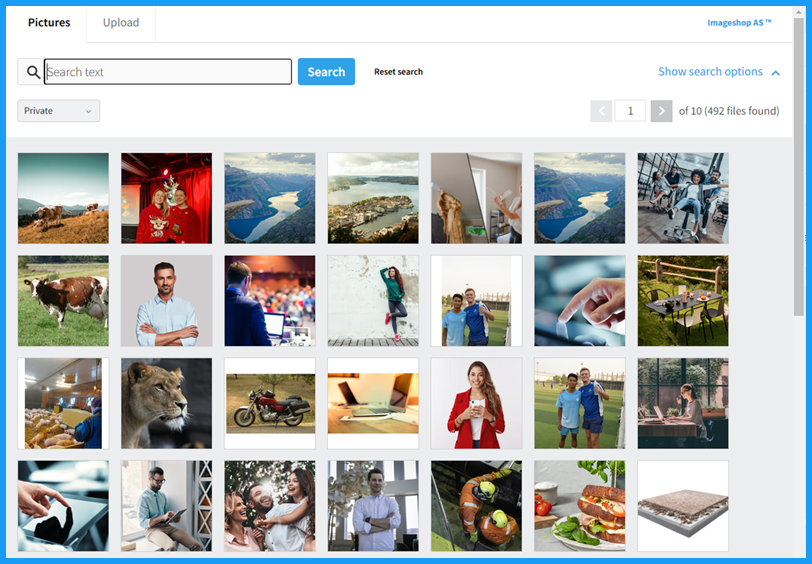
Imageshop is a complete Digital Asset Management system (DAM system) for organizing and sharing images, videos and documents. This plugin integrates Imageshop image picker neatly into Sanity, so that you can access all your company's images inside Sanity CMS with only one click. You can also upload photos to Imageshop without leaving Sanity.
This plugin (v2.x) targets Sanity Studio v5 and v6. For Sanity v3 and v4, use v1.x. For Sanity v2, see the V2 plugin here.
Installation
npm install @imageshop-org/sanity-plugin-asset-source-imageshopUsage
Add it as a plugin in sanity.config.ts (or .js):
import {defineConfig} from 'sanity'
import {imageShopAsset} from '@imageshop-org/sanity-plugin-asset-source-imageshop'

export default defineConfig({
  //...
  plugins: [imageShopAsset({})],
})
Note When using the plugin for the first time, a popup will show where you provide your Imageshop API key. The API key will be stored securely in your Sanity project using @sanity/studio-secrets.
Configuration
There are many ways to configure the interface for image selection.
| Configuration key | Description | Type | Default value |
|---|---|---|---|
| imageMaxSize | Max size of the image returned from imageshop to sanity. Format: WxH | string | 2048x2048 |
| imageAlias | Imageshop alias for permalink of image | string | "Large" |
| imageShopInterfaceName | Standard interface used when searching images. | string | |
| imageShopDocumentPrefix | Standard document code prefix used when uploading images. | string | |
| culture | Language for the client. Supports en-US and nb-NO. Norwegian is default (nb-NO) | string | "nb-NO" |
| profileId | Name of a profile, which has to be created by Imageshop, which will return several different sizes and aspect ratios. IMAGESHOPSIZE can not be used together with a profile, and showing size dialogue or crop dialogue doesn't make sense when using profiles. | string | |
| requiredUploadFields | String indicating upload fields which are required, separated by comma. Possible values: name, description, rights, credits, tags | string | |
| uploadFieldLanguages | List of languages which should be shown for name, description etc. Default = no,en. | string | |
| sanityAssetTextLanguage | What language to store in sanity, from the title, description and credit fields | string | "no" |
| exclusiveAssetSource | When true, replaces all built-in Sanity asset sources so only Imageshop is available | boolean | false |
| disableDirectUploads | When true, disables the direct upload button in Sanity image fields | boolean | false |
Enable multi batch upload
If you have an array of type image, you can enable multi batch upload with options.batchUpload: true.
When enabled, an additional button appears that lets you select multiple images and add them all to the array at once.
import {defineField, defineArrayMember} from 'sanity'

defineField({
  name: 'images',
  title: 'Images',
  type: 'array',
  options: {
    batchUpload: true,
  },
  of: [
    defineArrayMember({
      name: 'image',
      type: 'image',
      title: 'Image',
      options: {hotspot: true},
      validation: (Rule) => Rule.required().error('Image is required'),
    }),
  ],
})
Enable multi language text selection
If your sanity have multiple language you need to implement a language resolver, we need to know where to get the texts from in imageshop.
import {imageShopAsset} from '@imageshop-org/sanity-plugin-asset-source-imageshop'

imageShopAsset({
  languageResolver: () => {
    const currentLanguage = 'nb' // get from your language context

    if (currentLanguage === 'nb') {
      return 'no'
    }

    return 'no'
  }
})
Custom fields for multi-uploaded images
If you want to assign custom fields on the image object, you can create a custom field-mapper, which you can get texts from imageshop and then transfer the texts to the sanity image objects fields.
By default, the alt text from imageshop is mapped to sanity internal "description" field with fallbacks to imageshop description / title fields.
import {imageShopAsset} from '@imageshop-org/sanity-plugin-asset-source-imageshop'

imageShopAsset({
  // sanityAssetDocumentProps — the Sanity image asset document to be stored
  // imageShopData — raw data from Imageshop; must return the modified sanityAssetDocumentProps
  fieldMapper: (sanityAssetDocumentProps, imageShopData) => {
    // Do custom mapping of fields here. Example:
    console.log({sanityAssetDocumentProps, imageShopData})

    sanityAssetDocumentProps.description = imageShopData?.text.no.altText
    sanityAssetDocumentProps.creditLine = imageShopData?.text.no.credits

    return sanityAssetDocumentProps
  },
})
The imageShopData object the image data that is stored in imageshop. The object contains the following data:
type ImageShopAsset = {
  documentId: string
  code: string
  extraInfo: null | string
  AuthorName: null | string
  image: {
    file: string
    width: number
    height: number
    thumbnail: string
  }
  text: {
    [k: string]: {
      title: string
      altText: string
      description: string
      rights: string
      credits: string
      tags: string
      categories: string[]
    }
  }
  InterfaceList: Array<{
    InterfaceID: number
    InterfaceName: string
  }>
  profile: any
}
License
MIT © Imageshop AS
Develop & test
# in this project
npm run link-watch

# in another Sanity installation
npx yalc add @imageshop-org/sanity-plugin-asset-source-imageshop && npx yalc link @imageshop-org/sanity-plugin-asset-source-imageshop && npm install
This plugin uses @sanity/plugin-kit with default configuration for build & watch scripts.
See Testing a plugin in Sanity Studio on how to run this plugin with hotreload in the studio.