Studiofront
A native macOS menu bar app to manage Sanity Studios across organizations.
Studiofront
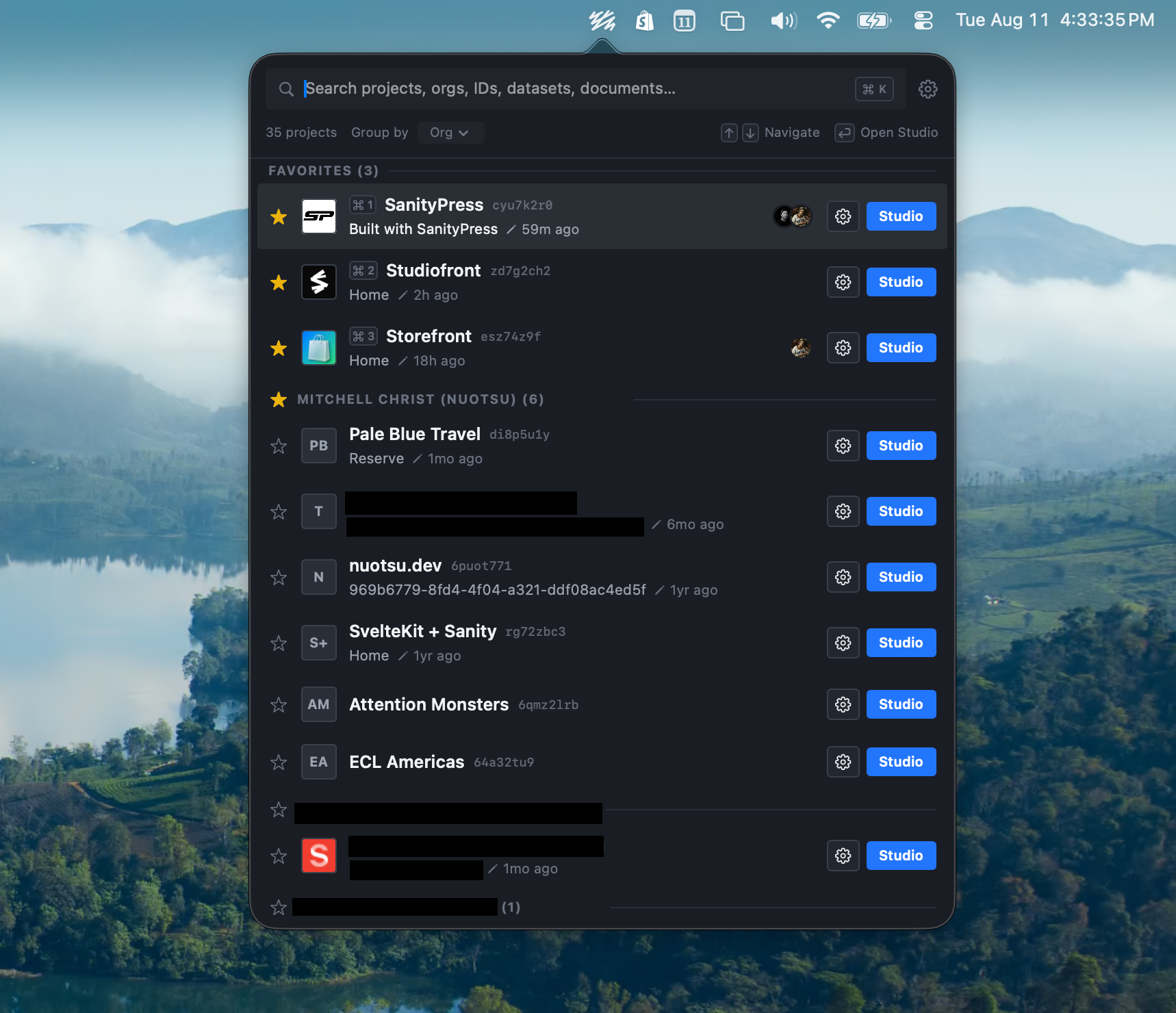
A native macOS menu bar app for agency developers and editors who manage many Sanity Studios across multiple client organizations. It's a fast switcher, not a management console: open it, find the right client Studio, jump there.
Download
Requires macOS 26 (Tahoe) or later, Apple Silicon. See all releases on the Releases page.
Who it's for
Anyone juggling Studios across several Sanity organizations — agencies, consultancies, and freelancers with multiple clients. Instead of bookmarking a dozen Studio URLs or hunting through the Sanity dashboard, Studiofront keeps every project one keystroke away.
Core Features
Fast, keyboard-first switching
- Menu-bar popover that opens instantly from cache, no network wait
- Live search across project name, nickname, org, project ID, dataset, and last-edited document
- Group by org or by last-edited, with favorites always pinned first
- Full keyboard navigation (
↑↓navigate,↵open Studio,⌥↵open linked site,⌘1–⌘9jump to favorites)
Presence — see who else is there
- Live avatar stack showing teammates actively viewing or editing a project
- Jump straight to the document a teammate currently has open
- Listen-only: Studiofront never announces your own presence
Per-user curation
- Favorite or hide projects, drag to reorder
- Custom nicknames and extra links (staging, localhost, self-hosted) Sanity itself doesn't know about
- Hidden projects dim instead of disappearing if they briefly drop out of a refresh
Activity at a glance
- Last-edited document per project, with type, draft status, and relative time
- Last-deploy timestamp
Two full themes
- Liquid Glass (native macOS 26 translucent materials) and Sanity UI (mirrors Sanity Studio's own design)
- Light/dark aware, full Dynamic Type and VoiceOver support
Zero-setup auth
- Detects your existing Sanity CLI login automatically, or accepts a personal access token
- Tokens live in the Keychain only
Auto-updates ship via Sparkle, so you always get the latest release without re-downloading.
Architecture
Studiofront is one app target plus four local Swift packages:
Studiofront/     app target — shell, popover, settings window
Packages/
  SanityKit/     Management API client, models, token storage
  PresenceKit/   PresenceProvider protocol + implementations
  ThemeKit/      theme protocol, token sets, styled primitives
  StudioStore/   persistence, curation state, merge logic
See studiofront-spec.md for the full build spec.
Building from source
- Install XcodeGen
- Copy
app/Config/Signing.local.xcconfig.exampletoapp/Config/Signing.local.xcconfigand fill in your AppleDEVELOPMENT_TEAMID (find it at developer.apple.com/account → Membership details). This file is gitignored. - From
app/, runxcodegen generate - Open
app/Studiofront.xcodeprojin Xcode, select theStudiofrontscheme, and run.
On first launch, Studiofront looks for a Sanity CLI auth token at ~/.config/sanity/config.json. If the sandbox can't read it, Settings offers a fallback to grant access or paste a token directly.
Releasing
See RELEASING.md.